
There is a specific way people fail this interview, and it has almost nothing to do with how much they know about machine learning.
The interviewer says: “Design a customer support assistant powered by an LLM.” The candidate draws a box labelled LLM, connects it to a database, and then spends thirty minutes explaining what embeddings are — while the interviewer waits, increasingly quietly, for someone to mention what happens when forty thousand people hit that box at the same time.
The candidate knows what RAG is. They can explain attention. They still get rejected.
Here’s why. An LLM system design interview is not a machine learning interview. It is a distributed systems interview in which one of your components is slow, expensive, non-deterministic, and occasionally makes things up. Every strong answer flows from those four properties. Every weak answer ignores them.
This guide is the preparation I wish I had before my first LLM system design interview. It covers the framework that works for any question in this category, the numbers you should be able to produce from memory, four back-of-envelope calculations worked end to end, fifteen real questions with answers written the way you’d actually say them in the room, and the mistakes that reject otherwise strong candidates.
It’s written for anyone preparing for AI engineer, ML engineer, applied AI, or senior backend roles at companies shipping products on top of large language models.
Table of Contents
- What this interview actually tests
- How you’re graded at mid, senior and staff level
- The 5-step framework
- Numbers you should know cold
- Four back-of-envelope calculations, worked
- 15 questions with model answers
- The 9 mistakes that get candidates rejected
- Score your own mock interview
- A 2-week preparation plan
- Key takeaways
- FAQ
What This Interview Actually Tests
Start here: an LLM system design interview is graded on different axes than the system design interviews you have already done.
Interviewers are trying to answer one question: can this person ship an LLM feature that works at scale without bankrupting us or embarrassing us?
That decomposes into five signals:
| Signal | What it sounds like when done well |
|---|---|
| Requirements discipline | You ask about traffic, latency targets, and whether the system must act or merely answer — before drawing anything |
| Cost and latency physics | You bring up tokens, time-to-first-token, prefill versus decode, and batching without being prompted |
| Grounding and correctness | You treat the model as an untrusted component and design retrieval, validation and evaluation around it |
| Operational maturity | Guardrails, observability, fallbacks, and how you’d detect a quality regression |
| Trade-off reasoning | Every choice has a “because,” and you can name what you gave up |
None of these require deriving the attention equation. If you can explain how a request flows through the system, where it bottlenecks, and what breaks first under load, you are in good shape.
How it differs from classic system design
An LLM system design interview keeps the same vocabulary and changes the assumptions underneath it.
Design Twitter, design a URL shortener — those assume components that are fast, cheap and deterministic. LLM system design breaks all three:
- Latency is seconds, not milliseconds. A single response takes 2–10 seconds. Streaming isn’t a nice-to-have, it’s how the product becomes usable at all.
- Cost scales with usage in a way databases don’t. Every token in and out is billed. A verbose system prompt duplicated across a million requests is a real line item, and we’ll calculate exactly how real below.
- Output is probabilistic. Identical input can produce different output. You can’t unit-test your way to correctness; you need evaluation sets, monitoring, and human review.
- The model is attackable through its input. Prompt injection is a security class that did not exist in classic system design.
How it differs from ML system design
Ask your recruiter which one you are getting; preparing for the wrong interview is the cheapest mistake to avoid.
ML system design is about training pipelines, feature engineering, model selection, offline and online evaluation of models you build. LLM system design mostly assumes a pre-trained model exists and asks how you build a reliable, fast, affordable product around it. Retrieval, prompt construction, inference serving, guardrails, evaluation.
If you prepared for one and got the other, that mismatch alone can sink the round. Ask the recruiter which it is.
How You’re Graded at Mid, Senior and Staff Level
An LLM system design interview is scored against the level you are being hired into, not against a single fixed bar.
The same question is asked at every level. What changes is what the interviewer needs to hear. This table is the thing I’d tattoo on the inside of your eyelids:
| Mid | Senior | Staff | |
|---|---|---|---|
| Architecture | Names the right components | Justifies each with a trade-off | Questions whether the feature should exist in this shape at all |
| Scale | Mentions caching and streaming | Does the token math out loud | Designs for the org: multi-team, multi-tenant, migration paths |
| Failure | Knows the model can hallucinate | Designs validation and fallbacks per failure mode | Talks blast radius, rollback, and what you page someone for |
| Evaluation | Says “we’d test it” | Golden set, online metrics, regression gates | Ties eval to business metrics and explains who owns the pipeline |
| Cost | Mentions it | Quantifies it | Names the lever that changes the cost curve, not just the constant |
The single most common levelling miss: a senior candidate gives a technically flawless mid-level answer because they never quantified anything. Say the numbers out loud. That is the difference.
The 5-Step Framework
One structure that works for any LLM system design interview question, whatever the product.
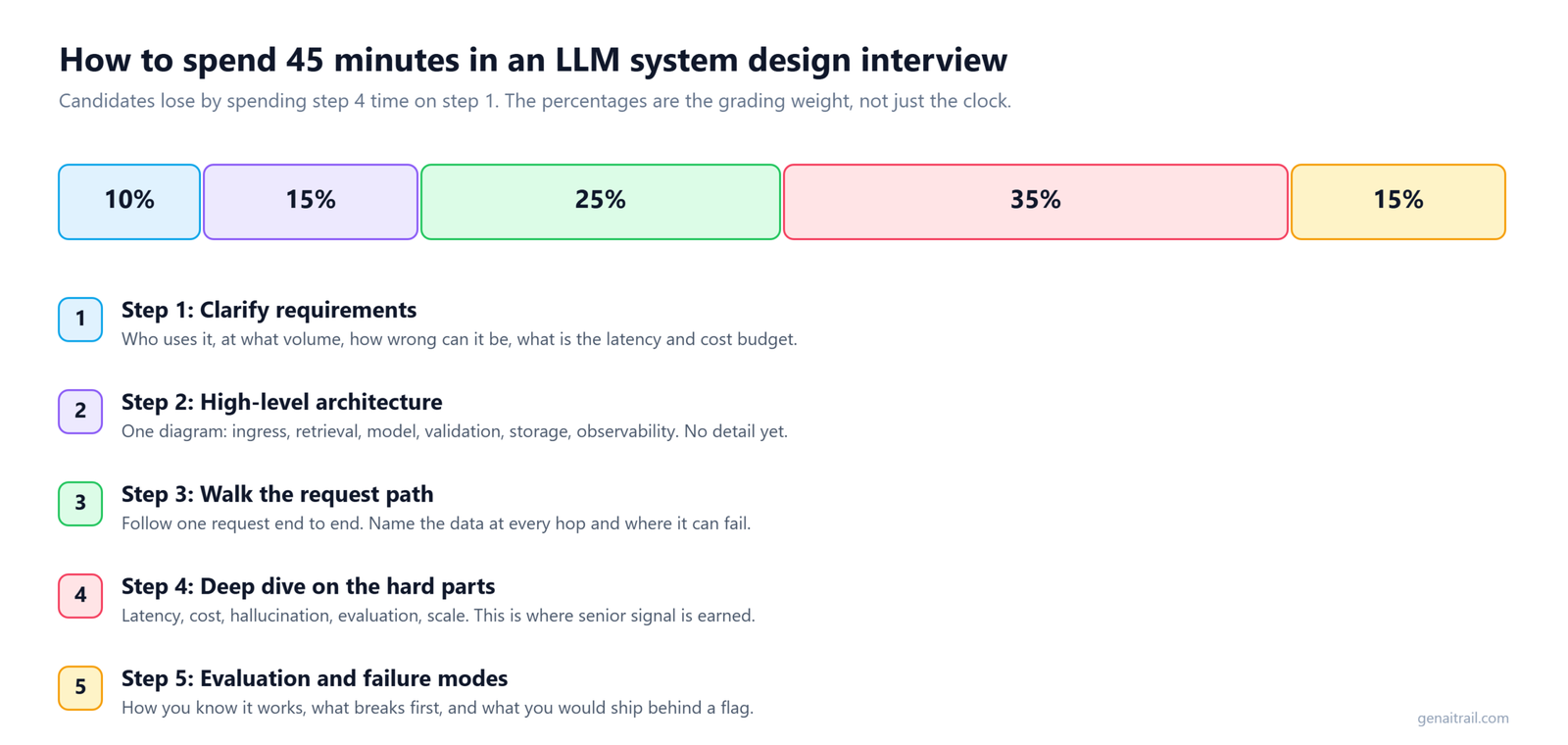
Use this on every question. The percentages assume a 45-minute round.
Step 1: Clarify requirements (10%, about 5 minutes)
Nothing else in an LLM system design interview can be graded until these are on the table.
Ask these, in this order:
- Who’s the user and what’s the scale? Internal tool for 200 support agents, or consumer product with 5 million monthly users? Changes everything downstream.
- What’s the latency target? Chat needs a first token inside a second. A batch summariser can take minutes.
- Does it act, or just answer? Answering means RAG. Acting means agents, tool calling, and an entire additional safety layer.
- Where does the knowledge live? Static docs, live APIs, per-user data? Changing hourly or yearly?
- What’s the accuracy bar and the cost of being wrong? A wrong answer in a coding assistant is annoying. In a medical or financial context it’s a lawsuit.
- What are the privacy constraints? Can data leave the VPC? Can you use a third-party model API at all?
Write the answers on the board. You’ll refer back constantly, and interviewers visibly relax when they see you do it.
The first 90 seconds, scripted
How you open sets the tone for the rest of the LLM system design interview.
Candidates freeze at the start. Have an opening ready:
“Before I draw anything, I want to pin down three things: the scale we’re designing for, the latency target, and whether this system needs to take actions or only answer questions. Those three change the architecture more than anything else. Can I ask about scale first?”
That’s it. It buys thinking time, it signals discipline, and it’s the same every time.
Step 2: Sketch the high-level architecture (15%)
Breadth first. Depth is what the rest of the LLM system design interview is for.
Draw these boxes, left to right. Nearly every LLM system has them:
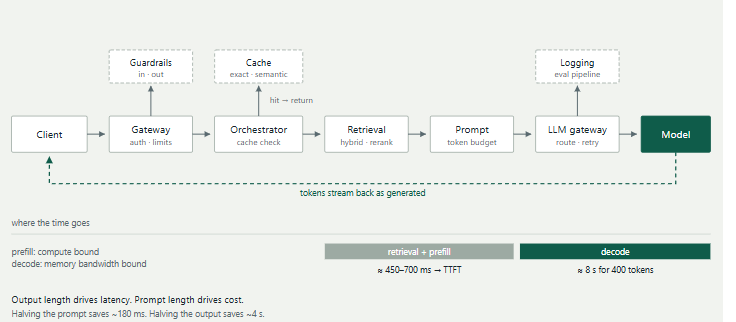
Name each box, one sentence each, don’t go deep yet. The interviewer needs the whole picture before you zoom.
The band along the bottom is the part worth memorising. Draw it and you’ve silently answered three follow-ups before they’re asked: where time goes, why prefill and decode behave differently, and which lever to pull when someone says “make it faster.”
Step 3: Walk the request path (25%)
This is the single highest-value habit in an LLM system design interview.
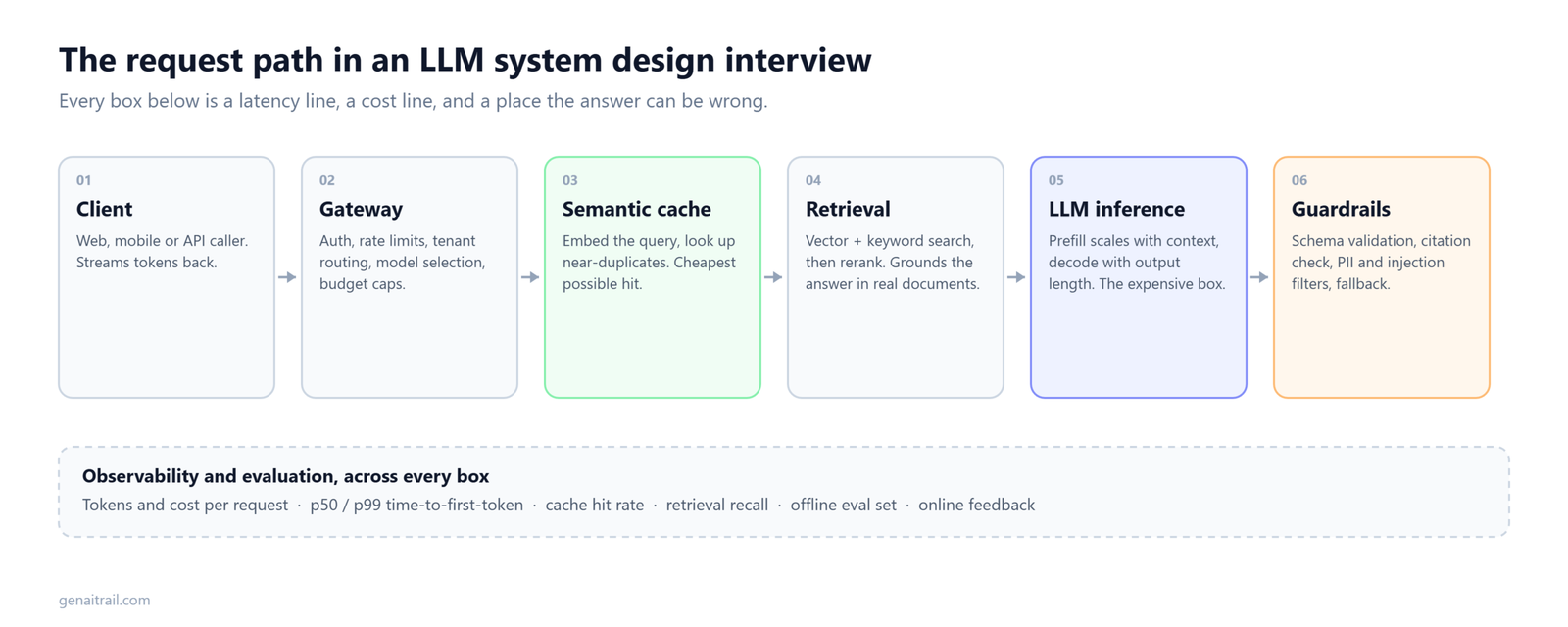
Trace one request from keystroke to final token:
- Request hits the gateway — auth, rate limiting, input moderation
- Orchestrator checks the exact-match cache, then the semantic cache
- On a miss, the query is embedded; retrieval runs vector search plus keyword search, then a re-ranker
- Prompt builder assembles system prompt + retrieved context + conversation history + user query, trimmed to a token budget
- LLM gateway routes to a model, handles retries and provider failover
- Model runs prefill (processes the prompt, parallel, compute-bound) then decode (generates one token at a time, memory-bandwidth-bound)
- Tokens stream to the client as generated
- Output moderation runs on the stream; response and metadata logged asynchronously
Say that fluently and you’re ahead of most candidates before you’ve deep-dived on anything.
Step 4: Deep dive on the hard parts (35%)
The largest block of marks in an LLM system design interview sits here.
The interviewer will steer. The usual targets: retrieval quality, latency, cost, correctness, safety, scale. Pick the one your Step 1 requirements say is riskiest, and go there first. Announcing why you picked it is itself a signal.
Step 5: Evaluation and what breaks (15%)
Ending on evaluation is what makes an LLM system design interview answer sound like production experience.
End every answer with how you’d know it works and what you’d watch. This is the step most candidates skip and the one that separates mid from senior.
“I’d keep a golden set of 500 question–answer pairs and run it nightly and on every prompt change. I’d track TTFT p50 and p99, tokens per request, cache hit rate, retrieval recall@5, and a sampled human-rated quality score. If quality drops after a model or prompt change, we roll back automatically.”
Numbers You Should Know Cold
Orders of magnitude, not precision. These are the figures an LLM system design interview expects you to carry in your head.
These are approximate and they shift, but the orders of magnitude hold, and reaching for them unprompted is a strong signal.
| Quantity | Typical range | Why it matters |
|---|---|---|
| Tokens per English word | ~1.3 | Convert word counts to tokens on the fly |
| Tokens per line of code | ~2–3× prose per character | Code tokenises far worse than English — this catches people out |
| Good time-to-first-token | 200–500 ms | Over 1s feels broken in chat |
| Decode speed per stream | 30–100 tokens/sec | A 500-token answer takes 5–15s; streaming is mandatory |
| Prefill speed | thousands of tokens/sec | Which is why prompt length hurts TTFT far less than output length hurts total time |
| Context window, frontier models | 128K–1M+ | But cost and latency scale with what you actually send |
| Embedding dimension | 384–3072 | × 4 bytes × chunk count = index memory |
| RAG chunk size | 256–1024 tokens | Smaller = precise but context-poor; larger = noisy embeddings |
| Top-k retrieved | 20 before re-rank, 3–5 after | Sending 20 chunks blows the token budget |
| Cost ratio, frontier vs small model | 10–50× | This is why model routing is worth building |
| Prefix cache discount | 50–90% off input tokens | Stable system prompts are nearly free on a hit |
| KV cache, 70B model, GQA | ~320 KB per token | The number that decides your concurrency ceiling |
Four Back-of-Envelope Calculations, Worked
Four calculations that turn a hand-wavy answer into a credible one in an LLM system design interview.
This section is the one that will separate you from every other candidate. Most people can describe an architecture. Almost nobody can cost it. Practise these until you can do them on a whiteboard while talking.
Calculation 1: Traffic to tokens to dollars
The calculation an LLM system design interview is most likely to ask you to do out loud.
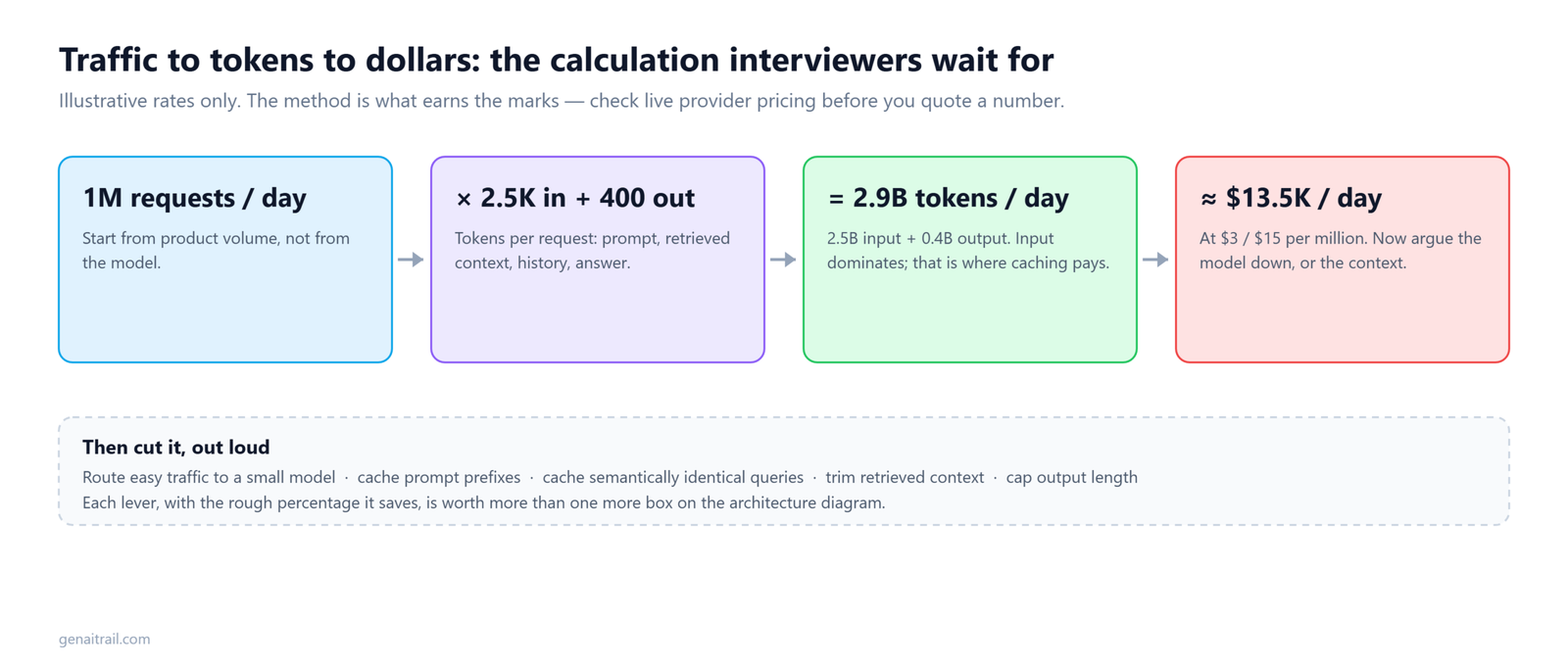
Setup: 5 million monthly users, 10 chats each, 4 turns per chat. Average 3,000 input tokens (system prompt + retrieved context + history) and 400 output tokens.
5,000,000 × 10 × 4              = 200,000,000 requests/month
200M ÷ (30 × 24 × 3600)         = 77 requests/second average
                                = ~230/sec at 3× peak

200M × 3,000 input tokens       = 600 billion input tokens/month
200M × 400 output tokens        =  80 billion output tokens/month
Now price it. Using illustrative rates of $3 per million input and $15 per million output — check current OpenAI and Anthropic pricing, the method matters more than the number:
frontier only:  600,000 × $3  +  80,000 × $15   = $3,000,000/month
small only:     600,000 × $0.15 + 80,000 × $0.60 =   $138,000/month
That 22× gap is the entire business case for model routing. Now apply a realistic mix — 70% of traffic to the small model, 40% cache hit rate overall:
routed + cached = $598,000/month
An 80% reduction, from architecture alone. Say that number out loud in an interview and watch the interviewer’s posture change.
The follow-up you should pre-empt: “How do you decide which queries go to the small model?” A lightweight classifier on the query, plus automatic escalation — if the small model’s output fails a validation check or its self-reported confidence is low, retry on the frontier model. You pay twice on a small fraction of requests and still win enormously.
Calculation 2: KV cache and GPU sizing
Reach for this whenever an LLM system design interview turns to self-hosting.
This is the one that marks you as someone who has actually self-hosted. The formula:
KV bytes per token = 2 (K and V) × layers × kv_heads × head_dim × bytes_per_value
For Llama-3 70B — 80 layers, 8 KV heads (grouped-query attention), head dimension 128, fp16:
2 × 80 × 8 × 128 × 2 bytes = 327,680 bytes ≈ 320 KB per token
So:
weights, fp16:      70B × 2 bytes           = 140 GB
KV at 8K context:   320 KB × 8,192          = 2.68 GB per concurrent request
KV at 32K context:  320 KB × 32,768         = 10.7 GB per concurrent request
On a node of 8×H100 (640 GB total), after weights and ~20 GB of activation overhead you have roughly 480 GB free:
480 GB ÷ 2.68 GB = ~178 concurrent requests at 8K context
Drop to 32K context and that collapses to about 44. Context length is a concurrency decision, not just a quality decision — that sentence alone is worth the price of this section.
The same model at 8B (32 layers, 8 KV heads, 128 head dim) costs 128 KB per token, 16 GB of weights, and fits roughly 562 concurrent requests on the same hardware. That’s the throughput argument for routing, stated in hardware rather than dollars.
A shortcut worth memorising
I pulled the published configs for four widely deployed open models and computed the KV cost of each:
| Model | Layers | KV heads | Head dim | KV per token | Per layer |
|---|---|---|---|---|---|
| Mistral-7B v0.3 | 32 | 8 | 128 | 128 KB | 4 KB |
| Llama-3 8B | 32 | 8 | 128 | 128 KB | 4 KB |
| Llama-3 70B | 80 | 8 | 128 | 320 KB | 4 KB |
| Qwen2.5-72B | 80 | 8 | 128 | 320 KB | 4 KB |
Every one of them landed on 8 KV heads × 128 head dimension. Grouped-query attention has effectively converged on that shape, which gives you a heuristic you can use without remembering any model’s config:
KV cache per token ≈ 4 KB × number of layers, for fp16 grouped-query models.
Layer count is the only variable you need. That’s the kind of thing that sounds like experience rather than revision.
The quantisation result that surprises people
Run the same arithmetic for a single 80 GB GPU and something counterintuitive falls out:
| Model | Precision | Weights | Concurrent @ 8K |
|---|---|---|---|
| Llama-3 8B | fp16 | 16 GB | 55 |
| Llama-3 8B | int8 | 8 GB | 62 |
| Llama-3 8B | 4-bit | 4 GB | 66 |
| Llama-3 70B | fp16 | 140 GB | doesn’t fit |
| Llama-3 70B | int8 | 70 GB | 2 |
| Llama-3 70B | 4-bit | 35 GB | 15 |
Quantising the 8B model all the way to 4-bit — a 4× reduction in weights, with real quality cost — buys you about 20% more concurrency. On the 70B it’s the difference between not running at all and serving 15 requests.
The reason: on a small model the KV cache dominates memory, not the weights. Shrinking the weights frees space you were barely short of. On a large model the weights dominate, so quantisation is what makes it fit in the first place.
So: quantise big models to make them fit, not small models to make them scale. If throughput on a small model is your problem, shorten the context or add GPUs. Very few candidates know this, and it’s exactly the sort of thing a staff-level interviewer probes for.
Calculation 3: Vector index memory
Retrieval scale is where an LLM system design interview stops being hypothetical.
Setup: 50 million enterprise documents, ~20 chunks each, 1,024-dimension embeddings.
50M × 20                        = 1 billion vectors
1B × 1,024 × 4 bytes            = 4.1 TB raw fp32
4.1 TB does not fit in RAM on anything sane, which forces the design:
int8 scalar quantisation (4×)   = 1.02 TB
product quantisation (~32×)     = 0.13 TB
Plus sharding by tenant or department so a typical query touches one shard rather than a billion vectors. Notice how the memory number drove the architecture. That’s the move — let the arithmetic dictate the design, out loud.
For contrast, a 1M-document internal wiki at 384 dimensions and 15 chunks per document is 15M vectors, about 23 GB raw. That fits in RAM on one machine with exact search and no quantisation at all. Same question, completely different answer, and the only thing that changed was a number.
Calculation 4: Latency budget
Decomposition beats guesswork, in an LLM system design interview and in production.
Decompose before you optimise:
retrieval + re-rank                        = 150–400 ms
prefill 3,000 tokens @ ~10,000 tok/s       = 300 ms
────────────────────────────────────────────────────
TTFT                                       ≈ 450–700 ms

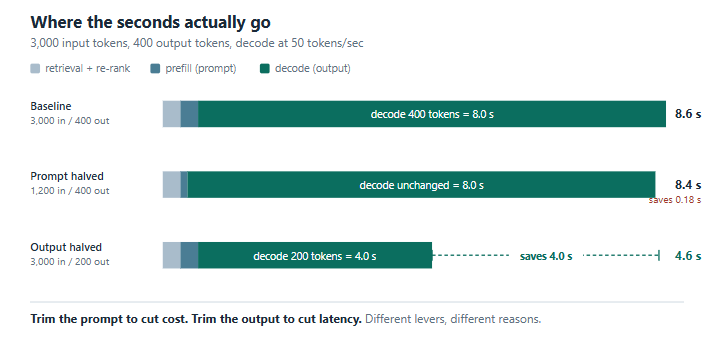
decode 400 tokens @ 50 tok/s               = 8.0 s
────────────────────────────────────────────────────
full response                              ≈ 8.6 s
Two conclusions fall straight out, and both are counterintuitive enough to impress:
Output length dominates total latency, not prompt length. Halving the prompt from 3,000 to 1,200 tokens saves about 180 ms. Halving the output from 400 to 200 tokens saves four seconds. If someone asks you to make it faster, ask about output length first.
But prompt length dominates cost. 3,000 in versus 400 out means input is 88% of your token volume. So you trim the prompt for money and trim the output for speed. Those are different levers pulled for different reasons, and mixing them up is a classic tell.
Run these on your own numbers
Flexibility with the arithmetic is what an LLM system design interview is really testing.
The four calculations above use one set of assumptions. Yours will differ, and the point of the exercise is fluency with the method rather than memorising my figures. The calculator below works all three of the sizing problems and shows the arithmetic chain for each, so you can see which line moves when you change an input:
Practise until you can reproduce the derivations on paper without it.
15 Questions With Model Answers
Fifteen LLM system design interview questions, ordered roughly by how often they come up.
Each answer is written the way you’d say it: structured, trade-off aware, short enough to leave room for follow-ups.
1. Design an LLM-powered customer support chatbot for e-commerce
Level: Mid–Senior · This is the “design Twitter” of LLM interviews. Expect it early in an LLM system design interview loop.
Clarify: External customers, ~1M monthly users, must answer policy questions and look up order status (so it needs tools), TTFT under 1s, hallucinated refund promises unacceptable.
Answer:
“I’d split this into a knowledge path and an action path, because they have different risk profiles.
Knowledge path: a RAG pipeline over the help centre, policies and product docs. Ingestion runs offline — chunk at roughly 512 tokens with 10–15% overlap, embed, store in a vector database alongside a keyword index. At query time, hybrid search, fuse with reciprocal rank fusion, re-rank the top 20 down to 5 with a cross-encoder, inject with source IDs so the model can cite.
Action path: a small set of typed tools — get_order_status(order_id), initiate_return(order_id, reason). The model proposes the call, the orchestrator validates arguments and checks the user actually owns that order. Anything involving money movement above a threshold goes to a human approval queue rather than executing.
Latency: stream tokens, cache exact repeats and semantically similar FAQs, route simple intents like ‘where’s my order’ to a smaller, faster model.
Safety: an input classifier for injection and off-topic requests; an output check that flags any response containing a dollar amount or a commitment the retrieved policy doesn’t support.
Evaluation: log every conversation, sample 1% for human rating, maintain a golden set of 300 real support questions with approved answers that runs on every prompt or model change.”
Follow-ups: Multi-turn context? Summarise older turns, keep the last 3–5 verbatim. Vector DB down? Fall back to keyword search; if that’s down too, answer from the system prompt only and tell the user retrieval is degraded rather than silently answering worse.
2. Design a RAG system over 50 million enterprise documents
Level: Senior · A staple of the LLM system design interview at product companies.
Answer:
“Scale changes the retrieval design far more than the generation design — the original RAG paper assumed a corpus you could hold in one index, and 50 million documents is not that. I did the arithmetic earlier — a billion vectors at 1,024 dimensions is 4.1 TB raw, so quantisation and sharding aren’t optimisations here, they’re requirements.
Ingestion is a distributed pipeline: parse (PDF, HTML, Office), clean, chunk, embed, index. Idempotent and resumable, because it will fail partway through and you don’t want to restart 50 million documents.
Metadata — source, date, ACL, document type — stored alongside each chunk and filtered before vector search. Post-filtering at this scale returns empty result sets constantly, and that bug is miserable to diagnose.
Freshness: change-data-capture on the source systems, re-embed only modified chunks, version chunks so a bad embedding-model migration can be rolled back.
Access control is the genuinely hard part. Every retrieved chunk must be checked against the requesting user’s permissions at query time, because ACLs change faster than indexes do. Cache permission lookups aggressively but never skip the check.
Retrieval quality: hybrid search, re-ranking, and query rewriting where the LLM reformulates a vague question into 2–3 search queries. Measure recall@10 against a labelled set and treat retrieval as its own service with its own SLOs, separate from generation.”
What separates a great answer: pre-filtering on ACLs, and naming the embedding-model migration problem. Almost nobody mentions either.
3. Design an LLM inference gateway used by 30 internal teams
Level: Senior/Staff · This is where an LLM system design interview starts to separate levels.
Answer:
“A multi-tenant proxy in front of multiple model providers.
Responsibilities: auth and per-team keys, per-team rate limits and budgets in tokens rather than requests, routing, retries with exponential backoff, provider failover, unified logging.
Routing: teams request a capability tier — ‘fast’, ‘balanced’, ‘best’ — not a specific model, so the platform team can swap providers underneath without breaking anyone. Support explicit pinning for teams that need reproducibility.
Caching: exact-match keyed on full prompt plus parameters, and an opt-in semantic cache per endpoint.
Cost controls: hard monthly token budgets per team, alerts at 50/80/100%. Over budget, requests downgrade to a cheaper tier rather than being rejected — failing soft beats failing hard for an internal platform.
Observability: every request logged with team, model, token counts, TTFT, total latency, content hash. Per-team dashboards. This is where the platform pays for itself: you can finally see who’s spending what.
Reliability: the gateway is stateless and horizontally scaled. Provider health checks every few seconds; error rate above threshold shifts traffic automatically. Bounded queue depth — when saturated, shed low-priority traffic rather than letting latency climb for everyone.”
4. How would you reduce latency in an LLM application that’s too slow?
Level: Mid · Extremely common as a follow-up. Common as a follow-up in the second half of an LLM system design interview.
Answer:
“Measure first, then attack in order of impact. Break it down: network, retrieval, prompt construction, queue wait, TTFT, decode. From the arithmetic, decode dominates for long outputs and prefill plus retrieval dominates TTFT.
In rough order of value:
- Stream tokens. Doesn’t reduce total time, slashes perceived latency. Do this first, always.
- Constrain output length. Decode is linear in output tokens — this is the biggest real lever. Cutting 400 tokens to 200 saves about four seconds.
- Cache. Exact and semantic for repeats; prefix caching for the stable system prompt.
- Route. Easy queries to a small model that’s several times faster.
- Cut the prompt. Three great chunks instead of ten mediocre ones. Worth a few hundred milliseconds of TTFT and a lot of money.
- Parallelise retrieval and preprocessing so they don’t run serially before the model call.
- Infrastructure: continuous batching, speculative decoding, quantised weights, keeping models warm.
I’d tie each change to p50 and p99 TTFT and end-to-end latency, and watch quality metrics simultaneously — smaller model, fewer chunks and shorter output all trade quality for speed.”
5. Design a code completion system like GitHub Copilot
Level: Senior · Worth rehearsing out loud before any LLM system design interview.
Answer:
“The defining constraint is latency: completions must appear in roughly 300 ms or developers switch the feature off. That single number rules out large models and long prompts on the inline path.
Architecture: the IDE debounces keystrokes, sends the file prefix, a suffix window for fill-in-the-middle, and a small set of related context — recently edited files, imports, symbols in scope — to an edge-deployed small code model.
Context selection is the main quality lever. A local ranker picks the most relevant snippets from open tabs and the repository within a tight budget of maybe 2–4K tokens.
Caching: the prefix changes one character at a time, so KV prefix caching is enormously effective here — most requests reuse nearly all previous computation. This is the highest-leverage optimisation in the whole design.
Serving: speculative decoding, continuous batching, multi-region deployment. Requests are cancellable — if the user keeps typing, abandon the in-flight request.
Separate slow path: a chat or ‘explain this code’ feature uses a bigger model with longer context and a multi-second budget. Don’t force both features through one model.
Evaluation: acceptance rate is the north star, with characters-retained-after-30-seconds as a quality check, since developers accept suggestions and then delete them. Offline, exact-match and functional correctness on held-out repositories.”
6. Design a system that summarises 100+ page documents
Level: Mid · The kind of question an LLM system design interview uses to find out whether you have shipped.
Answer:
“A hundred pages is roughly 50K tokens. Some models take that in one call, but it’s expensive, slow, and quality degrades on very long inputs — the ‘lost in the middle’ effect, where content in the centre of a long context gets less attention than content at either end. So I’d design for chunked processing and use single-pass only when the document fits comfortably.
Map-reduce with structure awareness: split at natural boundaries — sections, headings — not fixed token counts. Summarise each section in parallel with a mid-tier model, then summarise the summaries with a stronger model, passing section titles so the final output preserves structure.
Alternative — iterative refinement: process sections in order, updating a running summary. Better coherence, but serial and slower. Map-reduce for throughput, refinement when narrative continuity matters.
It’s a batch workload, so it goes through a queue with worker pools, not a synchronous API. User gets a job ID and a notification. Provider batch APIs are often around half price for this pattern.
Quality: ask for section references so users can verify claims, and run a separate faithfulness pass where a model checks each summary sentence against the source and flags unsupported ones.
Edge cases: scanned PDFs need OCR first, tables and figures need special extraction, mixed-language documents need per-section detection.”
7. How would you design the evaluation system for an LLM product?
Level: Senior · Asked by every company that has been burned by a bad model update. Skipping this is the most common way to lose an LLM system design interview.
Answer:
“Three layers, and you need all three.
Layer 1 — offline golden datasets. A few hundred to a few thousand real inputs with reference outputs or rubrics, covering important intents and known failure modes. Runs in CI on every prompt, retrieval or model change. Scored with deterministic checks where possible (did it cite a source? is the JSON valid?), LLM-as-judge against a rubric, and human review on a subset.
Layer 2 — online monitoring. Proxy metrics in production: thumbs up/down, regeneration rate, conversation abandonment, escalation to human, follow-up question length. Sample 1–5% of traffic for LLM-as-judge scoring using the same rubric as offline, so the numbers are comparable.
Layer 3 — A/B testing. For significant changes, split traffic and compare business metrics, not just quality scores.
Judge caveats: LLM judges have known biases — they prefer longer answers and answers in their own style. Calibrate against human ratings on a sample and re-check periodically, because the judge model gets updated too and your metric silently shifts underneath you.
Closing the loop: thumbs-down cases with comments get triaged weekly, and the interesting ones enter the golden set. The golden set is a living artefact, not a one-time deliverable.”
8. Design an AI agent that books travel
Level: Senior/Staff · Reserved for the harder end of an LLM system design interview.
Answer:
“Agents add multi-step planning and side effects. Both are dangerous, so the design is built around containing them.
Loop: plan–act–observe. The model receives the goal and typed tools — search_flights, get_price, hold_booking, confirm_booking — proposes an action, the orchestrator executes and returns the result, repeat until a final answer or a step limit.
Tool design: strict JSON schemas, arguments validated before execution, idempotent where possible. confirm_booking is the only irreversible tool and it requires explicit user confirmation — the agent presents itinerary and price, the user clicks, and only then does the orchestrator call it. The model never confirms on its own.
State: conversation history plus a structured scratchpad — candidate flights, constraints gathered — in a session store, so a crashed worker resumes rather than restarting.
Guardrails: step budget of maybe 15 tool calls, per-session cost budget, timeout, and a policy layer rejecting actions outside stated constraints — booking a $4,000 flight when the user said under $500.
Failure handling: external APIs fail constantly. Tools return structured errors the model can reason about — ‘no availability’, ‘rate limited, retry later’. After N failures, hand off to a human rather than looping.
Observability: every step traced — prompt, tool call, result, latency, cost — so a session can be replayed exactly. Non-negotiable for debugging agents, and the thing teams most regret not building first.”
9. How do you handle prompt injection when reading untrusted content?
Level: Mid–Senior. Worth reading alongside the OWASP Top 10 for LLM Applications, which most interviewers will recognise.
Answer:
“I’d start by being honest: there is no complete fix today. The design goal is defence in depth and limiting blast radius.
Separation: delimit untrusted content clearly and instruct the model to treat it as data, not instructions. Helps. Not sufficient alone.
Least privilege — the most important one. The model only gets tools it needs. A summarisation agent reading emails should not have a send_email tool at all. If it must, that tool requires user confirmation. This is what actually bounds the damage.
Input screening: a classifier or small model scans retrieved content for injection patterns before it reaches the main model. Catches the obvious cases.
Output validation: structured outputs with schema validation; check URLs, actions and data are within expected bounds. If the model was asked to summarise and emits a tool call, that’s a red flag.
Isolation: never let one user’s content reach another user’s context.
Monitoring: alert on spikes in tool calls, outputs containing instructions, or attempts to exfiltrate data to unexpected destinations.
The point isn’t claiming you’ve solved it. It’s showing you know the model is an attack surface and you’ve reduced what an attacker gets when they succeed.”
10. Design a semantic cache for an LLM application
Level: Mid · Security now comes up in nearly every LLM system design interview.
Answer:
“Exact-match caching hashes the full prompt and returns a stored response. Safe, easy, and hit rates are low because people phrase things differently.
A semantic cache embeds the query, does nearest-neighbour search over previous queries, and returns the cached response above a similarity threshold.
Key design decisions:
- What’s in the key: the query embedding, but also system prompt version, model ID, and user-scoped context. A hit against a different prompt version is a bug, and a subtle one.
- Threshold: tune on labelled data. Too low and you return wrong answers for subtly different questions — ‘cancel my order’ versus ‘cancel my subscription’ are near-identical in embedding space and completely different in intent. Start conservative, around 0.95 cosine, and move with evidence.
- What not to cache: anything personalised, anything time-sensitive, anything depending on conversation history.
- Invalidation: TTL by content type, plus explicit purge when the knowledge base or prompt changes.
- Storage: vector index for lookup, key-value store for responses. It must be fast itself — this is a latency optimisation that can become a latency problem.
Measure: hit rate, and crucially false-positive rate — sample hits and have a judge check whether the cached answer was actually right for the new query. A cache with a great hit rate serving subtly wrong answers is worse than no cache.”
11. RAG vs fine-tuning: how do you decide?
Level: Mid–Senior · A reliable way to show cost awareness in an LLM system design interview.
Answer:
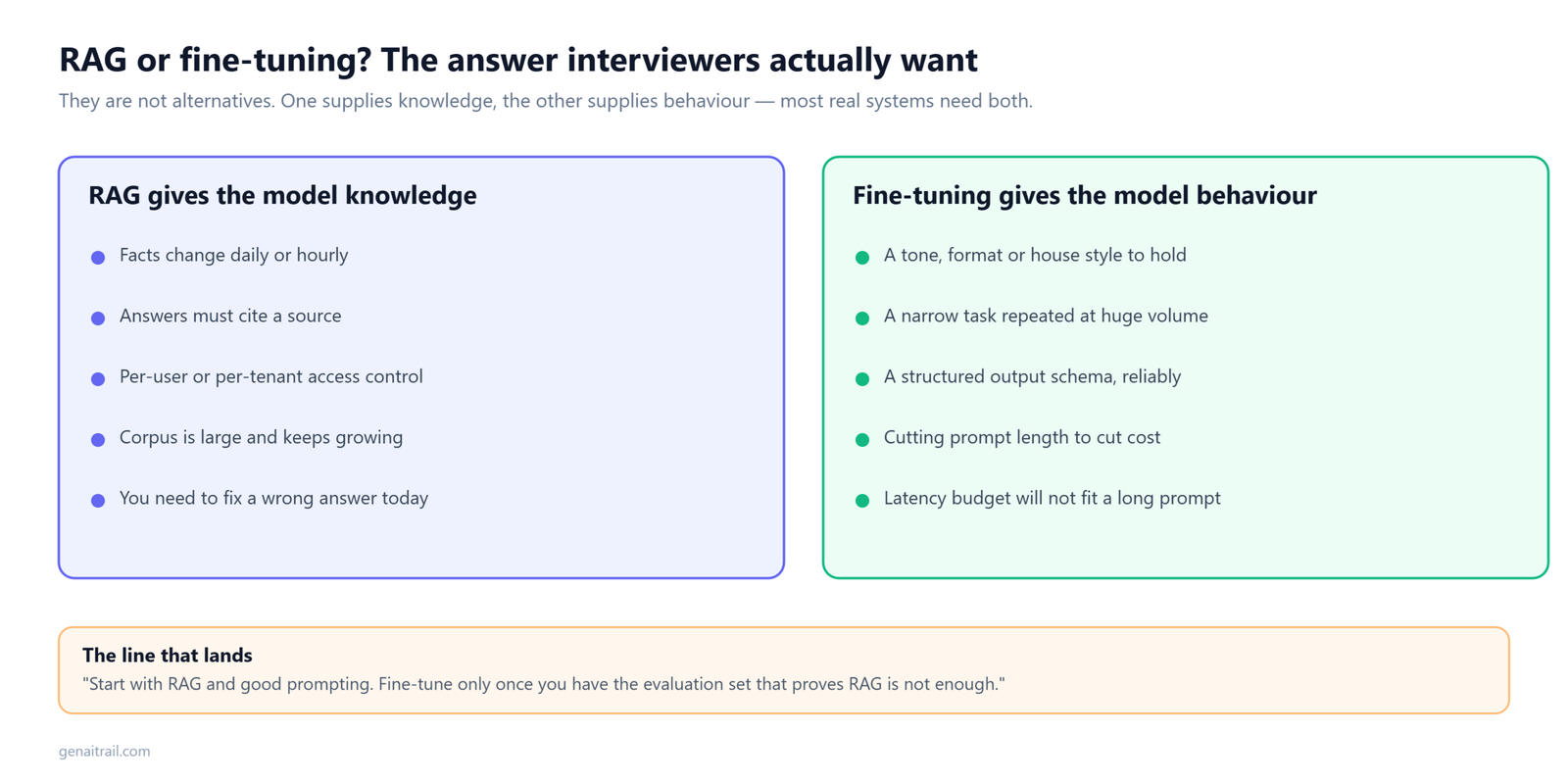
“They solve different problems, and the confusion comes from treating them as alternatives.
RAG gives the model knowledge. Use it when information changes, when you need citations, when data is user- or tenant-specific, or when you can’t retrain every time a document updates. Cheaper to iterate on and far easier to debug — if the answer is wrong you can look at what was retrieved.
Fine-tuning gives the model behaviour. Use it for consistent style, specific output formats, domain vocabulary, or when a small fine-tuned model can replace a large prompted one to cut cost and latency. It’s bad at injecting facts — knowledge in weights is fuzzy and hard to update.
Production systems often use both: a fine-tuned small model for format and tone, RAG for facts.
Decision heuristic: start with prompting. If the failure is ‘the model doesn’t know X’, add RAG. If it’s ‘the model knows X but answers in the wrong way’, consider fine-tuning. If it’s ‘too slow or expensive’, consider distilling into a smaller fine-tuned model.”
12. Design a multi-tenant LLM SaaS with strict data isolation
Level: Staff · The classic trade-off question in an LLM system design interview.
Answer:
“Isolation has to hold at every layer, because one leak between tenants is an existential event.
At rest: tenant-scoped indexes, or a shared index with tenant ID as a mandatory pre-filter enforced at the database layer, not the application layer. For the most sensitive tier, physically separate indexes and encryption keys.
In flight: the prompt builder pulls context only from the current tenant’s store, with a runtime assertion that every chunk in the prompt carries the current tenant ID — and it fails closed.
Model layer: shared foundation models are fine provided the provider doesn’t train on inputs, which is a contractual and configuration requirement you should state explicitly. Tenant fine-tunes get their own adapters, loaded per request, never shared.
Caching: cache keys include tenant ID. Semantic caches are per tenant or disabled.
Logging: tenant-partitioned with tenant-specific retention, PII redaction before write.
Noisy neighbours: per-tenant rate limits and token budgets, priority queues so one tenant’s batch job doesn’t starve another’s interactive chat.
Compliance: data residency, audit logs of every access, and complete deletion of a tenant’s data including from vector indexes and caches within an SLA. That last one is harder than it sounds — deleting from a quantised index usually means a rebuild.
Testing: automated tests that attempt cross-tenant retrieval and must return nothing, run on every deploy.”
13. When would you self-host inference instead of using an API — and how would you size it?
Level: Staff · Increasingly common as teams hit real bills. Enterprise LLM system design interview loops almost always include one of these.
Answer:
“Three reasons justify self-hosting: data can’t leave your environment, you need a fine-tuned model an API doesn’t offer, or your volume is high and steady enough that the arithmetic works.
The arithmetic, using the numbers from earlier. A 70B model in fp16 is 140 GB of weights and 320 KB of KV cache per token. On 8×H100 with 640 GB, after weights and overhead you have about 480 GB, giving roughly 178 concurrent requests at 8K context — or only about 44 at 32K.
That’s the crux: your context length sets your concurrency ceiling, and therefore your cost per request. A team that quietly raises the context window from 8K to 32K has just quadrupled their infrastructure cost without changing a line of serving code.
Why volume must be steady: a GPU node costs the same whether it’s at 5% or 95% utilisation. API pricing is marginal, self-hosting is fixed. Bursty traffic means you’re paying for peak capacity around the clock, and the crossover point moves against you badly.
What you’re taking on: capacity planning, autoscaling with multi-minute model load times, GPU failures, driver and kernel upgrades, quantisation quality regressions, and someone on call for it. That’s a team, not a project.
Practical middle ground: self-host the high-volume small model where most traffic goes, use an API for the low-volume frontier tier. You capture most of the savings for a fraction of the operational burden. That’s the answer I’d actually recommend, and I’d say so.”
14. Design a text-to-SQL assistant over a company’s data warehouse
Level: Senior · Very common at data-heavy companies. Infrastructure depth, and a frequent LLM system design interview curveball.
Answer:
“The naive version — paste the schema, ask for SQL — falls over on any real warehouse, for two reasons: the schema doesn’t fit in context, and a syntactically valid query can be semantically wrong in a way nobody notices until a decision is made on it.
Schema retrieval, not schema dumping. Index tables and columns with their descriptions, sample values and usage frequency. Retrieve only the relevant subset for a given question. A thousand-table warehouse becomes a five-table prompt.
Semantic layer. The highest-value component. Business terms — ‘active user’, ‘revenue’, ‘churn’ — have specific definitions that live in dbt models or a metrics layer, not in column names. Retrieve those definitions alongside the schema, or the model will invent plausible and wrong ones.
Validation before execution: parse the generated SQL, verify tables and columns exist, reject anything with write operations, enforce a LIMIT, and run EXPLAIN to catch full-table scans before they hit the warehouse.
Execution: read-only credentials, per-user row-level security applied by the warehouse itself rather than by the generated SQL, query timeout, cost cap.
Correction loop: on error, feed the message back and retry, capped at two or three attempts. Most failures are trivial column-name mistakes that self-correct immediately.
Show your work: display the generated SQL alongside results. Non-negotiable — analysts will not trust a number without the query, and the SQL is what makes an error catchable rather than silent.
Evaluation: execution accuracy on a labelled set of question–query pairs, comparing result sets rather than query strings, since many correct queries produce identical results.”
15. Design long-term memory for a conversational assistant
Level: Senior/Staff · The question that’s grown fastest in the last year. Memory design is a newer but fast-growing LLM system design interview topic.
Answer:
“‘Memory’ bundles four different problems and the first move is separating them.
Short-term is the conversation window — keep the last few turns verbatim, summarise older ones as you approach the token budget.
Episodic is what happened in past sessions. Store conversation summaries with timestamps, retrieve by relevance to the current query.
Semantic is durable facts about the user — preferences, constraints, their team, their timezone. Stored as discrete structured records, not free text.
Procedural is learned behaviour: how the user likes responses formatted. Effectively a per-user system prompt fragment.
Extraction: after a session, a background job proposes candidate facts. It must handle contradiction — ‘I work at Acme’ followed six months later by ‘I just started at Globex’ isn’t two facts, it’s an update with a supersession relationship. Store facts with timestamps and provenance, and let new facts retire old ones rather than accumulating both.
Retrieval: don’t dump the whole memory into every prompt. Retrieve the relevant subset, budget maybe 500 tokens, and always include high-priority durable constraints — allergies, accessibility needs — unconditionally.
The hard part is forgetting. Stale preferences produce responses that feel wrong in a way users find genuinely unsettling. Decay by recency and access frequency, and let users view and delete what’s stored. That last point isn’t only a UX nicety — under GDPR and similar regimes, extracted memories are personal data subject to access and deletion rights, which means memory needs a deletion path from day one.
Evaluation: a set of multi-session scenarios where the correct response depends on something established earlier, plus a negative set checking that outdated facts are not applied.”
The 9 Mistakes That Get Candidates Rejected
Every one of these has sunk an otherwise good LLM system design interview.
1. Drawing before clarifying. If you don’t know whether it’s 100 users or 100 million, or whether the system takes actions, you’re designing blind. Five minutes of questions saves forty minutes of the wrong design.
2. Treating the LLM as a source of truth. The moment you say “the model will know the answer,” the interviewer stops listening. The model is a reasoning engine; knowledge comes from retrieval or tools, and every output needs validation.
3. Forgetting streaming. If your chat product waits eight seconds and dumps a paragraph, you’ve built something users will hate.
4. Never quantifying anything. This is the most common senior-level rejection. Qualitative answers are mid-level answers no matter how sophisticated the vocabulary. Do the token math out loud.
5. No evaluation story. “How do you know it’s working?” is coming. “We’d test it” loses.
6. Hand-waving safety. “We’d add guardrails” is not a design. Say which, where in the flow, and what happens when they fire.
7. Going deep on the wrong thing. Twenty minutes on tensor parallelism when the question was a support bot on a third-party API says you can’t prioritise.
8. Designing for a scale nobody asked for. Proposing sharded quantised indexes and a custom serving stack for an internal tool with 200 users is the same failure as under-designing. Over-engineering reads as inexperience, not ambition.
9. Not saying what you’d give up. Every choice has a cost. Candidates who present designs with no downsides sound like they’ve never operated one. “I’d route to the small model, which costs us maybe two percent quality on complex queries — here’s how I’d measure whether that’s acceptable” is a senior answer.
Score Your Own Mock Interview
Score yourself the way an LLM system design interview panel would.
Reading model answers builds recognition, not recall. The gap only closes when you answer out loud and grade yourself honestly. Record a 35-minute attempt, then score it against this — one point each, no partial credit.
Requirements (0–5)
– [ ] Asked about scale before drawing anything
– [ ] Asked about the latency target
– [ ] Established whether the system acts or only answers
– [ ] Asked where knowledge comes from and how fast it changes
– [ ] Asked what happens when the system is wrong
Architecture (0–5)
– [ ] Named every component before deep-diving on any
– [ ] Traced one request end to end
– [ ] Distinguished prefill from decode
– [ ] Put retrieval and generation behind separate failure boundaries
– [ ] Explained why you deep-dived where you did
Quantification (0–5) — the section that separates levels
– [ ] Converted traffic to requests per second
– [ ] Converted requests to monthly token volume
– [ ] Attached a cost figure to at least one design choice
– [ ] Sized memory for something — index, KV cache, or both
– [ ] Named which number would break first as scale grows
Correctness and safety (0–5)
– [ ] Treated model output as untrusted
– [ ] Specified a concrete guardrail with a location and a trigger action
– [ ] Addressed prompt injection if untrusted content enters the system
– [ ] Described what happens when a dependency fails
– [ ] Named a failure mode you would not attempt to fix, and why
Evaluation (0–5)
– [ ] Described an offline golden set
– [ ] Named specific online metrics
– [ ] Explained how a regression gets caught before users see it
– [ ] Mentioned judge calibration or human review
– [ ] Closed the loop from production failures back into the eval set
Reading the score. Under 12 means you’re describing systems rather than designing them — go back to the framework. 12–18 is a solid mid-level performance. 19–23 reads as senior. Above 23, you’re being graded on communication rather than knowledge.
Two patterns to watch for on the recording. If your Quantification score is the lowest of the five, that single gap is probably what’s capping your level, and it’s the fastest to fix. And if you never once said what a choice cost you, you sound like someone who has designed these systems but never operated one.
A 2-Week Preparation Plan
Two weeks is enough to prepare for an LLM system design interview if you spend it on the right things.
Days 1–2: Foundations. Tokens, context windows, prefill versus decode, embeddings, why attention cost grows with sequence length. Not the maths — the implications for latency and cost.
Days 3–4: RAG. Chunking, hybrid search, re-ranking, query rewriting, recall@k. Build a small one if you haven’t. Nothing teaches chunking trade-offs like watching a bad chunk ruin an answer.
Days 5–6: Serving and scaling. Streaming, caching (exact, semantic, prefix), routing, continuous batching, speculative decoding, quantisation, self-host versus API.
Days 7–8: Agents and safety. Tool calling, plan–act–observe, step budgets, human-in-the-loop, prompt injection, output validation.
Days 9–10: Evaluation and operations. Golden sets, LLM-as-judge, online metrics, A/B testing, what to alert on.
Day 11: The math. Work all four calculations from scratch on paper until you don’t need the calculator. This is the highest-return day in the plan.
Days 12–13: Mock interviews. Take questions from this list and answer out loud in 35 minutes with a timer. Record yourself and score each attempt with the rubric above. You will be startled how often you skip requirements or forget evaluation entirely.
Day 14: Review and rest.
For broader coverage of the ML and generative AI fundamentals that often appear alongside the design round, work through our 250 AI and machine learning interview questions. If you want hands-on RAG experience before Days 3–4, build a RAG pipeline from scratch with Python and FAISS and read chunking strategies for RAG — the chunking trade-offs come up in almost every retrieval deep-dive. And if you’re running open models locally to prepare, our guide to fixing CUDA out of memory errors will save you an evening.
Key Takeaways
If you remember nothing else before your LLM system design interview, remember these.
- It is a distributed systems interview, not an ML one. An LLM system design interview grades you on latency, cost, correctness and blast radius — not on whether you can derive attention.
- Treat the model as an unreliable component. Ground it with retrieval, constrain it with schemas, check it with validation. Almost every strong LLM system design interview answer is built around that single assumption.
- Walk one request end to end. Naming the data at every hop is the habit that most reliably separates a passing LLM system design interview from a failing one.
- Do the arithmetic out loud. Traffic to tokens to dollars, then KV cache and index sizing. Four calculations cover most of what an LLM system design interview will ask you to estimate.
- Finish on evaluation. How you would know it works, what breaks first, what ships behind a flag. This is the step candidates skip and interviewers remember.
- Say what you do not know. Calibrated uncertainty is rewarded in an LLM system design interview for the same reason it is rewarded on the job.
Frequently Asked Questions
Quick answers to what people ask most about the LLM system design interview.
What is an LLM system design interview?
A system design interview where the system includes one or more large language models as core components. You’re asked to architect products like chatbots, RAG systems, coding assistants or agents, and evaluated on latency, cost, correctness, safety and scale rather than ML theory.
How is it different from an ML system design interview?
ML system design covers training pipelines, feature engineering and model selection for models you build. LLM system design assumes a pre-trained model and focuses on building a reliable, affordable product around it. Ask your recruiter which round you’re getting — preparing for the wrong one is a common and avoidable failure.
Do I need to know how transformers work?
You need the implications, not the maths. Cost and latency scale with tokens; prefill and decode have different bottlenecks; context windows are finite and expensive. Nobody will ask you to derive attention.
What are the most common questions?
Customer support chatbot, RAG over a document corpus, reducing latency, inference gateway, code assistant, agent with tools, and the RAG-versus-fine-tuning trade-off. All seven have model answers above.
How much math do I actually need to do?
More than most candidates do, less than you fear. Traffic to tokens to dollars, and rough memory sizing. Four calculations, all arithmetic. It’s the highest-signal, lowest-effort preparation available.
What if I don’t know the answer to a follow-up?
Say so, then reason. “I haven’t implemented speculative decoding, but my understanding is a small draft model proposes tokens the large model verifies in parallel — so it helps when the draft is usually right. I’d benchmark before committing.” Interviewers reward calibrated uncertainty and punish confident invention. That’s not just interview advice, it’s the same instinct the job requires.
How long should I spend on each part?
Roughly 5 minutes requirements, 7 architecture, 10 request path, 15 deep dives, 5–7 evaluation. Adjust as the interviewer steers.
Is this the same as a voice assistant or multimodal design question?
The framework transfers, but the latency budget changes completely — real-time voice needs sub-500ms end-to-end, which forces streaming speech-to-text, a small fast model, and streaming text-to-speech in an overlapping pipeline rather than a serial one. If you’re interviewing at a voice company, prepare that budget specifically.
What’s the single most important thing to mention?
That the model’s output cannot be trusted by default. Every strong answer designs around that: retrieval to ground it, validation to check it, evaluation to measure it, guardrails to contain it.
Preparing for an AI role? This guide is updated as interview patterns shift. If you were asked something not covered here, leave a comment — the best questions get added.
