
Meta’s Muse Glimmer 30B is a new open-weight model designed not simply to chat, but to act.
The AI industry has spent years chasing larger and larger models.
Now, Meta is betting on something different: make the model small enough to actually live on your device, then optimize it specifically for doing things.
On August 10, 2026, Meta Superintelligence Labs introduced Meta Muse Glimmer 30B, a 30-billion-parameter open-weight model designed for local, agentic workloads. It is released under the permissive Apache 2.0 license and is intended to run on consumer hardware rather than requiring a cloud-scale inference cluster.
That distinction matters.
Meta Muse Glimmer 30B isn’t being positioned as another general-purpose chatbot trying to compete purely on benchmark scores. Meta’s goal is more practical: build a model that can sit on your computer and continuously interact with tools, codebases, files, documents, and applications.
In other words, Glimmer is designed to be an AI worker rather than merely an AI conversationalist.
🤖 AI Overview: Meta Muse Glimmer 30B Quick Facts
- Model Architecture: 30-Billion parameter open-weight multimodal foundation model optimized for autonomous AI agent workflows.
- Hardware Requirement: Runs locally on a single consumer GPU (24GB VRAM e.g., RTX 3090, RTX 4090, or Apple Silicon Mac).
- Core Strengths: Native tool use and low-latency local execution. Note that tool calls are emitted as channel-scoped ATEM messages, not JSON, so your runtime needs a matching parser.
- License: Open-weight Apache 2.0 license for research and commercial deployment.
- Deployment Options: Quantized GGUF formats supported via Ollama, LM Studio, and vLLM.
Table of Contents
- 1. What Exactly Is Meta Muse Glimmer 30B?
- 2. Why 30B Is Interesting
- 3. The Agentic Difference
- 4. Distillation: The Secret Behind Glimmer
- 5. Long Context Without the Usual Pain
- 6. The Speed Problem & Speculative Decoding
- 7. How Does Meta Muse Glimmer 30B Compare?
- 8. The Hardware Story
- 9. Open Weights Change the Game
- 10. Where Meta Muse Glimmer 30B Could Go Next
- 11. Final Thoughts
What Exactly Is Meta Muse Glimmer 30B?
Meta Muse Glimmer 30B is a 30B dense multimodal model developed by Meta Superintelligence Labs.
Its primary targets include:
- Agentic workflows
- Function and tool calling
- Coding
- Long-context tasks
- Multimodal understanding
- LLM-as-a-judge evaluation
- Local AI assistants
Meta says the model was specifically designed around the constraints of local hardware. Rather than taking a large model and simply shrinking it, the company developed a compact architecture and training recipe intended to preserve agentic capabilities at a much smaller scale.
The model also accepts both text and images through a dedicated perception encoder. That means a local agent can potentially reason over screenshots, charts, documents, and other visual inputs rather than being limited to plain text.
And perhaps most importantly, the weights are available openly under the Apache 2.0 license.
Why 30B Is Interesting
Thirty billion parameters might sound enormous. For local AI, however, it’s becoming a sweet spot.
A model this size can potentially offer significantly more capability than the tiny 3B–8B models commonly used on laptops, while remaining dramatically easier to run than 70B+ models.
The problem is memory. At full precision, Meta says a 30B model would require more than 55 GB of memory. That’s far beyond what many consumer GPUs can comfortably provide.
Meta’s solution is aggressive quantization. The company compresses Meta Muse Glimmer 30B to approximately 4-bit weights, bringing the language model to under 20 GB. This leaves additional memory for the KV cache, vision encoder, and speculative-decoding components on hardware in the 24–32 GB range.
That changes the equation considerably. A model that once required expensive server hardware can now become something a developer can potentially run on a single high-end consumer GPU or a sufficiently capable Mac.
🏗️ Inside Muse Glimmer’s Architecture
Under the hood, Glimmer contains approximately 29.6 billion parameters, including its vision component.
The core language model is a dense causal Transformer.
Here’s the basic architecture:
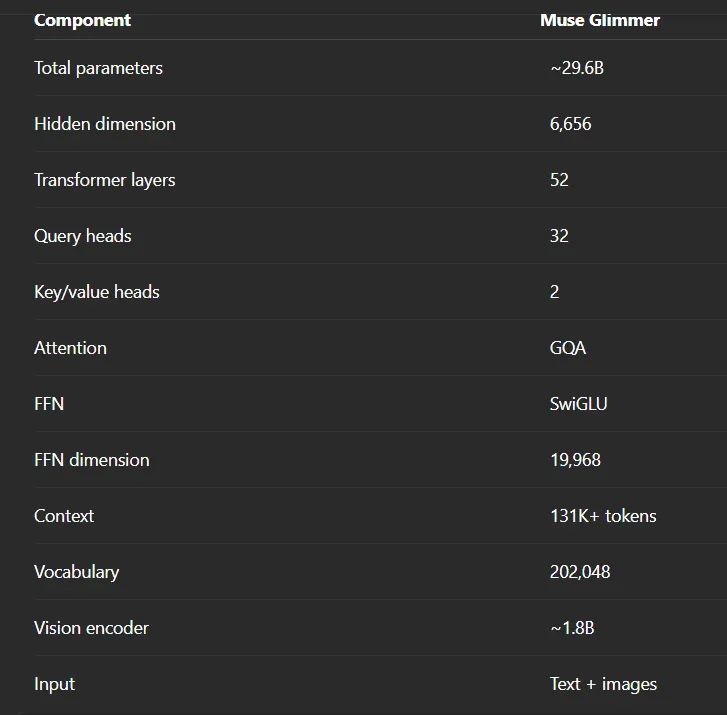
The architecture is interesting because Meta is clearly optimizing for inference efficiency, not simply maximum model size.
⚡ Aggressive Grouped-Query Attention
Glimmer uses Grouped Query Attention (GQA) with:
32 query heads
but only:
2 key/value heads
That’s a 16:1 ratio.
Why does that matter?
Because the key/value cache can consume substantial memory during long-context inference.
Reducing the number of KV heads lowers memory requirements and memory bandwidth.
For a model targeting 131K+ token contexts, this is particularly important.
The goal is to make long-context inference practical without requiring enormous amounts of VRAM.
🔄 Local + Global Attention
Glimmer also uses a hybrid attention pattern.
The model repeatedly applies:
Local → Local → Local → Global
The local layers use a sliding window of around 2,048 tokens, while the global layers allow information to propagate across the larger context.
This creates a compromise.
Fully global attention can become extremely expensive at long context lengths.
But purely local attention makes it harder for distant information to interact.
Glimmer’s architecture attempts to get some of the advantages of both.
👁️ A Dedicated Vision Encoder
Glimmer isn’t text-only.
Meta includes a dedicated approximately 1.8-billion-parameter ViT-G/14 vision encoder.
The encoder is designed to understand visual information such as:
- 📸 Screenshots
- 📊 Charts
- 📄 Documents
- 🖥️ Interfaces
- 🖼️ Images
This is particularly valuable for AI agents.
Think about a coding agent operating a development environment.
Sometimes the information isn’t sitting in a text file.
It might be inside:
- a graphical interface,
- an error dialog,
- a chart,
- a dashboard,
- or a screenshot.
For an agent, the ability to understand visual state expands the environment it can operate in.
The Agentic Difference
The word “agent” has become one of the most overloaded terms in AI. But the basic idea is straightforward: a chatbot answers your question. An agent takes a goal and works through the steps required to accomplish it.
For example, instead of asking: “How do I fix this bug?”, you could give an agent access to a repository and ask: “Find why this test is failing, fix the issue, run the tests, and explain what changed.”
Meta says Meta Muse Glimmer 30B was trained specifically around these behaviors. Its evaluation includes agentic benchmarks such as DeepSearch QA, MCP-Atlas, τ-Bench, and SWE-Bench, covering tasks involving tool use, coding, debugging, and multi-turn workflows.
Distillation: The Secret Behind Glimmer
One of the most interesting parts of Meta Muse Glimmer 30B is how Meta trained it. The company says Glimmer’s pre-training used logit distillation from Muse Spark, its much larger teacher model.
Glimmer’s training then progressed through multiple stages: mid-training introduced longer-context and agent-heavy data, while post-training combined supervised fine-tuning, on-policy distillation, and reinforcement learning across general reasoning, coding, and agentic tasks.
1️⃣ Phase One: Pre-Training Logit Distillation
Glimmer learns from outputs produced by Muse Spark.
Rather than learning only from raw text, the smaller model gets access to the behavior and probability distributions of a larger teacher model.
This helps transfer broader knowledge and reasoning patterns.
2️⃣ Phase Two: Mid-Training
The second phase introduces:
- Longer-context data
- Agent-heavy workloads
- Richer reasoning traces
- Organic training data
The goal is to make Glimmer better at maintaining coherent reasoning over much longer sequences.
3️⃣ Phase Three: Post-Training
The final stage combines:
- Supervised fine-tuning
- On-policy distillation
- Reinforcement learning
across:
- General tasks
- Reasoning
- Coding
- Agentic workflows
This is where Glimmer learns not simply to produce good answers, but to behave more like an agent.
And this strategy highlights an important direction for the open-model ecosystem:
Smaller models don’t necessarily need to reproduce frontier training from scratch. They can inherit useful capabilities through distillation.
Long Context Without the Usual Pain
Another major feature is context length. Meta lists Meta Muse Glimmer 30B at 131K+ context, making it suitable for tasks involving large codebases, lengthy documents, and extended agent trajectories.
For local agents, this matters enormously. A large context window allows more of the working environment to remain available without constant retrieval operations.
The Speed Problem & Speculative Decoding
There is another obstacle to local agents: latency. Meta addresses this in Meta Muse Glimmer 30B using speculative decoding with a lightweight DFlash-based drafter.
Meta reports approximately:
- 3.1× faster generation on RTX 5090
- 1.8× faster on M5 Max
- 1.5× faster on M4 Max
How Does Meta Muse Glimmer 30B Compare With Other 30B-Class Models?
Meta explicitly compares Meta Muse Glimmer 30B against models including Gemma 4 31B and Qwen 3.6 27B, claiming strong results for its size category across several agentic, coding, multimodal, safety, and reasoning evaluations.
| Benchmark | Muse Glimmer 30B | Gemma 4 31B | Qwen 3.6 27B |
|---|---|---|---|
| MCP Atlas | 75.5 | 54.2 | 62.5 |
| DeepSearch QA | 74.6 | 61.7 | 71.1 |
| τ3-Banking | 23.5 | 15.1 | 16.7 |
| WildClawBench | 47.6 | 37.6 | 43.2 |
| Gaia2 | 43.3 | 36.4 | 40.0 |
| SWE-Bench Pro | 51.2 | 36.9 | 50.2 |
| SWE-Bench Verified | 76.0 | 66.6 | 77.2 |
| CharXiv Reasoning | 78.8 | 77.7 | 78.4 |
Two things are worth noting rather than glossing over. Muse Glimmer leads clearly on the agentic benchmarks, which is what it was built for — the MCP Atlas gap in particular is large. But Qwen 3.6 27B edges it out on SWE-Bench Verified (77.2 against 76.0), and on CharXiv reasoning the three models are within about a point of each other. If your workload is general coding rather than tool-driven agent work, the case for switching is much weaker than the headline numbers suggest.
The Hardware Story
The most exciting thing about Meta Muse Glimmer 30B is its hardware envelope. Bringing the language model below 20 GB allows it to coexist in a 24 GB or 32 GB memory budget on single consumer GPUs or Mac workstations.
💻 The Real Story: Local AI
This is where Muse Glimmer becomes especially interesting.
A 30B model at full BF16 precision still requires substantial memory.
Meta’s answer is aggressive quantization.
The company provides two 4-bit variants designed for consumer GPUs.
⚡ K-Quant-Dynamic
Designed for approximately 32GB GPUs.
Meta reports around 0.2% degradation compared with the full-precision model.
⚡ K-Quant-17GB
Designed for approximately 24GB GPUs.
Meta reports roughly 1% degradation.
That is a very small trade-off for dramatically reducing hardware requirements.
And it changes the question from:
“Which cloud API should I use?”
to:
“Can my own GPU run this?”
That’s a much more interesting question.
🚀 DFlash Makes Glimmer Much Faster
Quantization isn’t the only optimization.
Meta also provides DFlash, a speculative decoding drafter.
Instead of asking the main model to generate every token sequentially, DFlash predicts blocks of tokens that the main model can verify.
The system can predict blocks of 16 tokens in one forward pass.
Meta reports these results:
The RTX 5090 result is especially striking:
233.4 tokens per second.
That’s fast enough to make a sophisticated local model feel genuinely interactive.
And for agents, speed matters even more.
An agent might perform dozens or hundreds of model calls during a single workflow.
Reducing inference latency at every step can dramatically improve the total experience.
Open Weights Change the Game
Meta is releasing Meta Muse Glimmer 30B under the Apache 2.0 license. The company has announced integrations across platforms including llama.cpp, MLX, ExecuTorch, vLLM, SGLang, Ollama, LM Studio, and Unsloth.
To learn more about Meta’s open-weight research, visit the official Meta AI Research Hub and explore model downloads on the Hugging Face Repository.
📊 Muse Glimmer 30B Benchmarks
The most interesting results appear on agentic and reasoning workloads.
For the high-reasoning configuration, Meta reports:
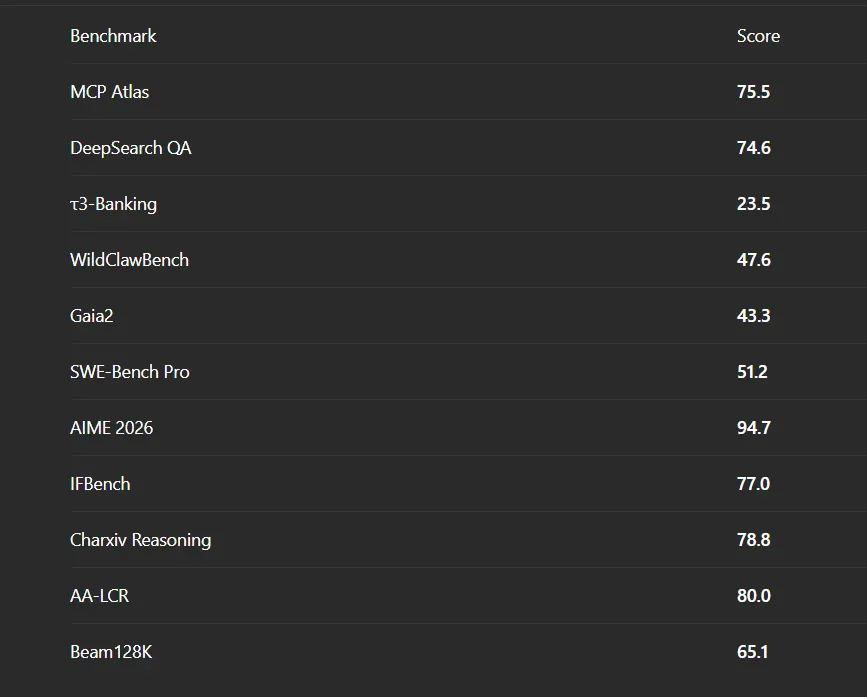
Some of these numbers are particularly notable.
AIME 2026: 94.7%
SWE-Bench Pro: 51.2%
MCP Atlas: 75.5
These aren’t simply chatbot benchmarks.
Several measure whether the model can actually perform complex reasoning or interact with tools.
That’s much closer to the workloads developers increasingly want AI systems to handle.
Where Meta Muse Glimmer 30B Could Go Next
The most interesting possibility is that models like Meta Muse Glimmer 30B become the operating layer for personal AI agents. For more AI tutorials and career insights, check out our Generative AI Guide and AI Career Opportunities on GenAITrail.
Final Thoughts
Meta Muse Glimmer 30B is interesting because Meta built it around a specific idea: What if a powerful AI agent could run locally, quickly, and privately on hardware ordinary developers can actually own? With Meta Muse Glimmer 30B, Meta is making a serious argument that 30 billion parameters might be enough.
Frequently Asked Questions About Meta Muse Glimmer 30B
What is Meta Muse Glimmer 30B?
Answer: Meta Muse Glimmer 30B is an open-weight 30-billion parameter multimodal AI model specifically engineered by Meta Superintelligence Labs for local autonomous agent execution, function calling, tool use, and workflow automation on consumer hardware under the Apache 2.0 license.
Can Meta Muse Glimmer 30B run on a single GPU?
Answer: Yes, Meta Muse Glimmer 30B is optimized for single-GPU execution. In 4-bit (GGUF Q4_K_M) quantization, the model consumes under 20 GB VRAM, allowing it to run comfortably on single consumer GPUs with 24GB VRAM such as the NVIDIA RTX 3090, RTX 4090, or Apple M-series Macs.
How do I run Meta Muse Glimmer 30B in LM Studio or Ollama?
Answer: For plain chat, download the GGUF weights from Hugging Face and load them in LM Studio or Ollama — that works with no extra configuration. Tool calling is the part that trips people up. Muse Glimmer does not emit JSON tool calls and does not wrap its reasoning in <think> tags; it produces channel-scoped ATEM messages instead, so a generic OpenAI-style tool-call parser will not read its output. For agent behaviour, serve it with vLLM and run both dedicated parsers together:
vllm serve /model \
  --served-model-name muse-glimmer \
  --tensor-parallel-size 1 \
  --enable-auto-tool-choice --tool-call-parser muse_glimmer \
  --reasoning-parser muse_glimmer \
  --generation-config auto
The reasoning parser also needs skip_special_tokens=False so the structural markers survive, and running the tool-call parser without the reasoning parser is not supported. Source: the official vLLM recipe for this model.
