
LangGraph evaluation is the process of testing whether a LangGraph agent gives correct answers, uses the right tools, follows the expected graph path, and stays reliable in production. This guide adds Langfuse tracing and evaluation details so you can monitor real agent behavior, not just final text. LangGraph Evaluation is part of the GenAITrail LangGraph topic cluster. Read Complete LangGraph Tutorial first if you want the full roadmap.
LangGraph knowledge network: tutorial | state | memory | MCP | multi-agent architecture | evaluation | deployment | error handling
Problem
An agent can look impressive in a demo while using the wrong tool, ignoring permissions, hallucinating sources, or failing edge cases.
Explanation
LangGraph evaluation should measure final answer quality, retrieval quality, tool trajectory, state transitions, latency, cost, and safety constraints.
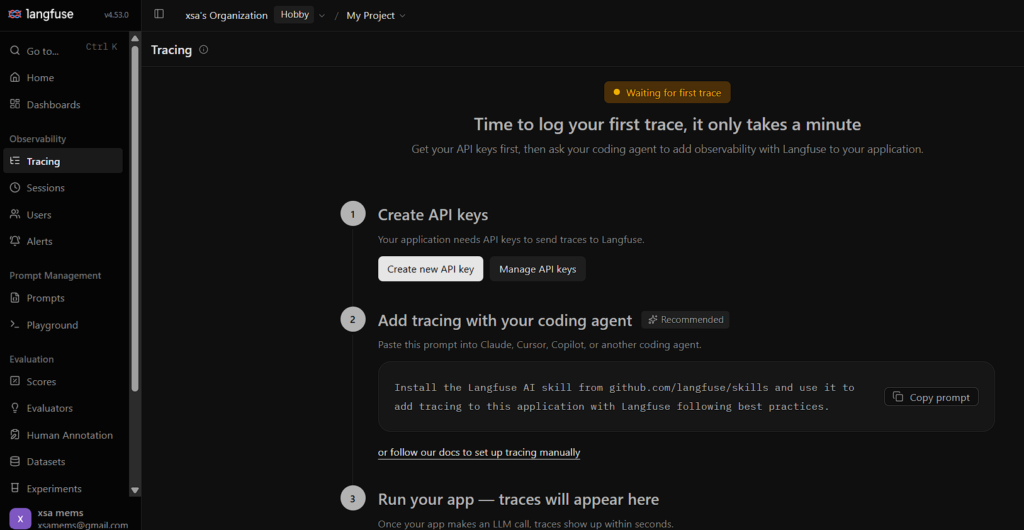
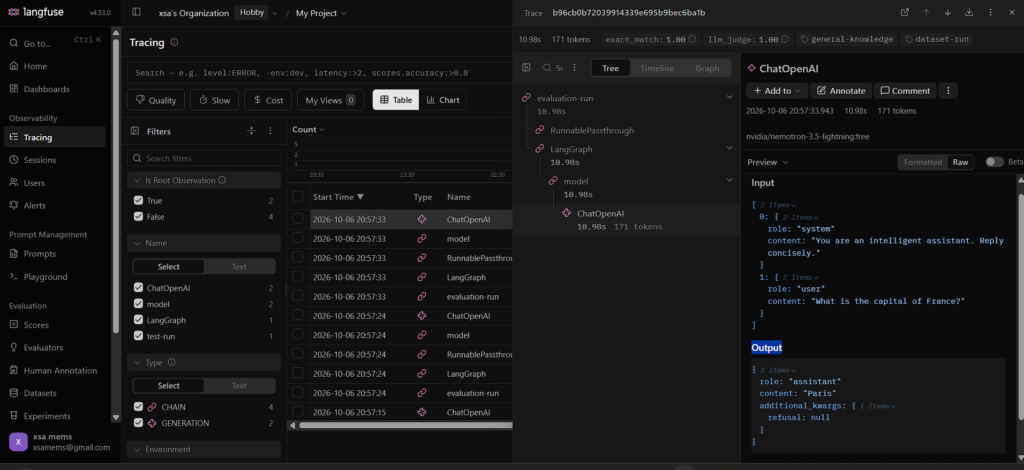
Langgraph has a frame work which helps to trace all the requests and give us a web interface Ui to check the traces with timestamp.
Evaluation closes the loop for the complete tutorial, multi-agent architecture, and production deployment.
Implementation
Build datasets from real questions, expected documents, approved tool calls, and known failure cases. Run evals on every meaningful graph or prompt change.
Step1 : create account in Langfuse by signing in to the url https://langfuse.com/ and create a api key
Project Structure
langgraph-langfuse-eval/
├── .env # API keys and configuration
├── requirements.txt # Python dependencies
├── src/
│ ├── agent.py # LangGraph agent definition
│ ├── llm_client.py # OpenAI client via TokenRouter
│ ├── tracing.py # Langfuse callback setup
│ ├── evaluators.py # LLM-as-judge + deterministic evaluators
│ ├── run_evaluation.py # Evaluation pipeline entrypoint
│ └── create_dataset.py # Upload evaluation dataset
├── data/
│ └── eval_dataset.json # Evaluation examples
create a project in local and open the folder with Vscode and follow the steps
Step 1: Environment Setup
Install Dependencies
bash
pip install langfuse langgraph langchain langchain-openai openai datasets python-dotenv
This mirrors the recommended stack from the Langfuse LangGraph evaluation cookbook
Configure Environment Variables
Create a .env file:
bash
# Langfuse credentials
# Langfuse credentials
LANGFUSE_PUBLIC_KEY=your public key
LANGFUSE_SECRET_KEY= your secret key
LANGFUSE_HOST=https://us.cloud.langfuse.com

# OpenRouter (OpenAI-compatible) credentials
OPENROUTER_API_KEY=your key
OPENROUTER_BASE_URL=https://openrouter.ai/api/v1
OPENROUTER_MODEL=openrouter/free
Initialize and Verify Langfuse Client
Set Up the Callback Handler
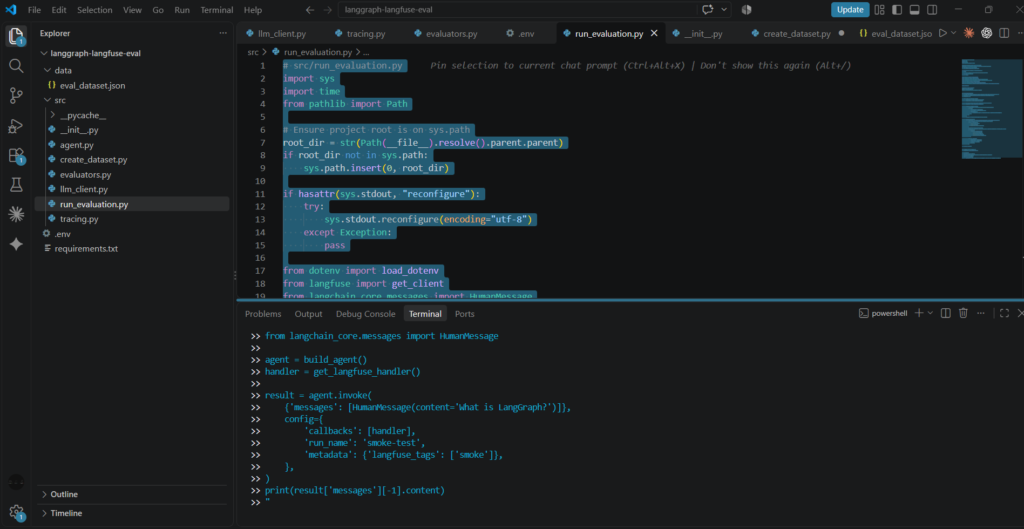
Langfuse integrates with LangGraph through LangChain callbacks. The callback handler automatically captures nested spans for LLM calls, tool invocations, and node transitions
# src/tracing.py
import os
import sys
from pathlib import Path
from dotenv import load_dotenv
from langfuse import get_client
from langfuse.langchain import CallbackHandler

# Ensure project root is on sys.path
root_dir = str(Path(__file__).resolve().parent.parent)
if root_dir not in sys.path:
    sys.path.insert(0, root_dir)

if hasattr(sys.stdout, "reconfigure"):
    try:
        sys.stdout.reconfigure(encoding="utf-8")
    except Exception:
        pass

load_dotenv()

langfuse = get_client()

# Ensure backward compatibility for accessing handler.trace_id
if not hasattr(CallbackHandler, "trace_id"):
    CallbackHandler.trace_id = property(lambda self: self.last_trace_id)

if langfuse.auth_check():
    print("✅ Langfuse client authenticated and ready")
else:
    raise RuntimeError("❌ Langfuse authentication failed — check credentials")


def get_langfuse_handler() -> CallbackHandler:
    """Create a plain Langfuse callback handler (no metadata args in v3/v4)."""
    return CallbackHandler()


if __name__ == "__main__":
    from langchain_core.messages import HumanMessage
    from langchain_core.runnables import RunnablePassthrough
    from src.agent import build_agent

    agent = build_agent()
    handler = get_langfuse_handler()

    # Wrap the agent in a chain to ensure metadata fields are picked up
    chain = RunnablePassthrough() | agent

    # Metadata goes into the config, not the handler
    config = {
        "callbacks": [handler],
        "run_name": "Q&A Agent — Basic",  # ← trace name
        "metadata": {
            "langfuse_session_id": "session-001",  # ← groups traces
            "langfuse_user_id": "user-42",  # ← filter by user
            "langfuse_tags": ["demo", "evaluation"],  # ← filter by tags
        },
    }

    result = chain.invoke(
        {"messages": [HumanMessage(content="What is LangGraph?")]},
        config=config,
    )

    print(result["messages"][-1].content)
The get_client() call initializes Langfuse using environment variables, and auth_check() verifies the connection
Step 2: Build the LangGraph Agent
Define the LLM Client
python
# src/llm_client.py
import os
import sys
from dotenv import load_dotenv
from langchain_openai import ChatOpenAI
from openai import OpenAI

if hasattr(sys.stdout, "reconfigure"):
    try:
        sys.stdout.reconfigure(encoding="utf-8")
    except Exception:
        pass

load_dotenv()

DEFAULT_PRIMARY_MODEL = "nvidia/nemotron-3-ultra-550b-a55b:free"
DEFAULT_FALLBACK_MODEL = "openrouter/free"


def get_openrouter_client() -> OpenAI:
    """Return an OpenAI client configured for OpenRouter."""
    api_key = os.getenv("OPENROUTER_API_KEY") or os.getenv("TOKENROUTER_API_KEY")
    base_url = os.getenv("OPENROUTER_BASE_URL") or os.getenv("TOKENROUTER_BASE_URL", "https://openrouter.ai/api/v1")
    return OpenAI(
        base_url=base_url,
        api_key=api_key,
    )


def chat_completion_with_fallback(
    client: OpenAI,
    messages: list[dict],
    model: str = DEFAULT_PRIMARY_MODEL,
    fallback_model: str = DEFAULT_FALLBACK_MODEL,
    extra_body: dict | None = None,
):
    """Call OpenRouter completions with automatic fallback to openrouter/free on errors or upstream overload."""
    try:
        response = client.chat.completions.create(
            model=model,
            messages=messages,
            extra_body=extra_body,
        )
        if not response.choices or getattr(response, "error", None):
            err_msg = getattr(response, "error", {}).get("message", "No response choices returned")
            raise RuntimeError(f"Model '{model}' error: {err_msg}")
        return response, model
    except Exception as e:
        print(f"⚠️ {model} failed: {e}. Switching to '{fallback_model}'...")
        response = client.chat.completions.create(
            model=fallback_model,
            messages=messages,
            extra_body=extra_body,
        )
        return response, fallback_model


def get_llm(model: str = "openrouter/free"):
    """Return a LangChain chat model pointing to OpenRouter."""
    api_key = os.getenv("OPENROUTER_API_KEY") or os.getenv("TOKENROUTER_API_KEY")
    base_url = os.getenv("OPENROUTER_BASE_URL") or os.getenv("TOKENROUTER_BASE_URL", "https://openrouter.ai/api/v1")
    return ChatOpenAI(
        model=model,
        base_url=base_url,
        api_key=api_key,
        temperature=0,
        max_retries=5,
    )


if __name__ == "__main__":
    client = get_openrouter_client()

    print("--- 1. First API call with reasoning ---")
    initial_messages = [
        {
            "role": "user",
            "content": "How many r's are in the word 'strawberry'?",
        }
    ]

    response, active_model = chat_completion_with_fallback(
        client=client,
        messages=initial_messages,
        model=DEFAULT_PRIMARY_MODEL,
        fallback_model=DEFAULT_FALLBACK_MODEL,
        extra_body={"reasoning": {"enabled": True}},
    )

    message = response.choices[0].message
    print(f"[{active_model}] Assistant:", message.content)

    reasoning_details = getattr(message, "reasoning_details", None)
    if reasoning_details:
        print(f"[{active_model}] Reasoning details captured.")

    # Preserve assistant message and reasoning_details
    assistant_dict = {
        "role": "assistant",
        "content": message.content,
    }
    if reasoning_details is not None:
        assistant_dict["reasoning_details"] = reasoning_details

    followup_messages = [
        {"role": "user", "content": "How many r's are in the word 'strawberry'?"},
        assistant_dict,
        {"role": "user", "content": "Are you sure? Think carefully."},
    ]

    print("\n--- 2. Second API call (continuing reasoning) ---")
    response2, active_model2 = chat_completion_with_fallback(
        client=client,
        messages=followup_messages,
        model=active_model,
        fallback_model=DEFAULT_FALLBACK_MODEL,
        extra_body={"reasoning": {"enabled": True}},
    )

    message2 = response2.choices[0].message
    print(f"[{active_model2}] Assistant:", message2.content)
Define the LangGraph Agent
# src/agent.py
from typing import Annotated
from typing_extensions import TypedDict
from langgraph.graph import StateGraph, START, END
from langgraph.graph.message import add_messages
from langchain_core.messages import SystemMessage, HumanMessage
from src.llm_client import get_llm
class AgentState(TypedDict):
messages: Annotated[list, add_messages]
def build_agent(system_prompt: str = “You are an intelligent assistant. Reply concisely.”):
“””Build and compile a LangGraph agent.”””
llm = get_llm()
def call_model(state: AgentState):
messages = [SystemMessage(content=system_prompt)] + state[“messages”]
response = llm.invoke(messages)
return {“messages”: [response]}
graph = StateGraph(AgentState)
graph.add_node(“model”, call_model)
graph.add_edge(START, “model”)
graph.add_edge(“model”, END)
return graph.compile()
This is the minimal Q&A agent pattern from the Langfuse evaluation guide.
Step 3: Create an Evaluation Dataset
Langfuse Datasets let you run controlled experiments and compare runs over time. Create a dataset from a JSON file:
data/eval_dataset.json
[
{
“input”: {“question”: “What is the capital of France?”},
“expected_output”: “Paris”
},
{
“input”: {“question”: “Who wrote ‘1984’?”},
“expected_output”: “George Orwell”
},
{
“input”: {“question”: “What is 12 * 12?”},
“expected_output”: “144”
}
]
Upload it to Langfuse:
python
# src/create_dataset.py
# src/create_dataset.py
import json
from langfuse import get_client

langfuse = get_client()

with open("data/eval_dataset.json") as f:
    items = json.load(f)

dataset = langfuse.create_dataset(
    name="general-knowledge-eval",
    description="General knowledge Q&A for agent evaluation",
)

for item in items:
    langfuse.create_dataset_item(
        dataset_name="general-knowledge-eval",
        input=item["input"],
        expected_output=item["expected_output"],
    )

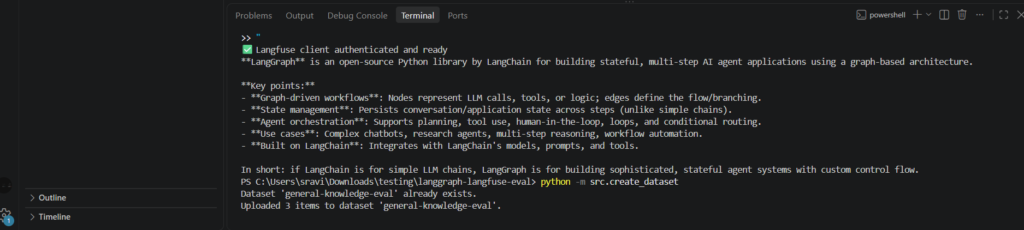
print(f"✅ Uploaded {len(items)} items to dataset 'general-knowledge-eval'")
Step 5: Define Evaluators
Deterministic Evaluator (Exact Match)
python
# src/evaluators.py
# src/evaluators.py
def exact_match_evaluator(
input: dict,
output: str,
expected_output: str,
**kwargs,
) -> dict:
“””Score 1.0 if output contains the expected answer, else 0.0.”””
expected_str = str(expected_output).lower().strip()
match = expected_str in str(output).lower()
return {
“name”: “exact_match”,
“value”: 1.0 if match else 0.0,
“comment”: f”Expected ‘{expected_output}’ in output” if not match else “Match found”,
}
# src/evaluators.py (continued)
from src.llm_client import get_llm
JUDGE_PROMPT = “””You are an evaluation judge. Score the following response on a scale of 0 to 1.
Question: {question}
Expected answer: {expected}
Agent response: {response}
Criteria:
– 1.0: Response is correct and complete
– 0.5: Response is partially correct or vague
– 0.0: Response is incorrect or irrelevant
Return ONLY a JSON object: {{“score”: <float>, “reasoning”: “<brief explanation>”}}”””
def llm_judge_evaluator(
input: dict,
output: str,
expected_output: str,
**kwargs,
) -> dict:
“””Use an LLM to judge the quality of the agent’s response.”””
llm = get_llm()
prompt = JUDGE_PROMPT.format(
question=input[“question”],
expected=expected_output,
response=output,
)
response = llm.invoke(prompt)
import json, re
try:
parsed = json.loads(re.search(r”\{.*\}“, response.content, re.DOTALL).group())
score = float(parsed[“score”])
reasoning = parsed.get(“reasoning”, “”)
except Exception:
score = 0.0
reasoning = “Failed to parse judge response”
return {
“name”: “llm_judge”,
“value”: score,
“comment”: reasoning,
}
LLM-as-Judge Evaluator
Langfuse provides built-in support for LLM-as-judge evaluators. You configure an evaluator once, and it runs on new traces automatically
Step 6: Run the Evaluation Pipeline
python
# src/run_evaluation.py
# src/run_evaluation.py
import sys
import time
from pathlib import Path

# Ensure project root is on sys.path
root_dir = str(Path(__file__).resolve().parent.parent)
if root_dir not in sys.path:
    sys.path.insert(0, root_dir)

if hasattr(sys.stdout, "reconfigure"):
    try:
        sys.stdout.reconfigure(encoding="utf-8")
    except Exception:
        pass

from dotenv import load_dotenv
from langfuse import get_client
from langchain_core.messages import HumanMessage
from langchain_core.runnables import RunnablePassthrough
from src.agent import build_agent
from src.tracing import get_langfuse_handler
from src.evaluators import exact_match_evaluator, llm_judge_evaluator

load_dotenv()

langfuse = get_client()
agent = build_agent()
chain = RunnablePassthrough() | agent


def run_experiment():
    """Run the agent against every dataset item and score results."""
    dataset = langfuse.get_dataset("general-knowledge-eval")
    results = []

    for item in dataset.items:
        question = item.input["question"]
        expected = item.expected_output

        # Trace each item with Langfuse (plain handler)
        handler = get_langfuse_handler()

        result = chain.invoke(
            {"messages": [HumanMessage(content=question)]},
            config={
                "callbacks": [handler],
                "run_name": "evaluation-run",
                "metadata": {
                    "langfuse_tags": ["dataset-run", "general-knowledge"],
                },
            },
        )
        output = result["messages"][-1].content

        # Run evaluators
        for evaluator in [exact_match_evaluator, llm_judge_evaluator]:
            time.sleep(2)  # Pause to respect rate limits
            score = evaluator(
                input=item.input,
                output=output,
                expected_output=expected,
            )
            # Attach score to the trace
            trace_id = handler.last_trace_id or getattr(handler, "trace_id", None)
            if trace_id:
                langfuse.create_score(
                    trace_id=trace_id,
                    name=score["name"],
                    value=score["value"],
                    comment=score["comment"],
                )

            results.append({
                "question": question,
                "expected": expected,
                "output": output,
                **score,
            })

    return results


if __name__ == "__main__":
    results = run_experiment()

    # Summary
    print(f"\n{'='*60}")
    print(f"Evaluation Results — {len(results)} scores")
    print(f"{'='*60}")
    for r in results:
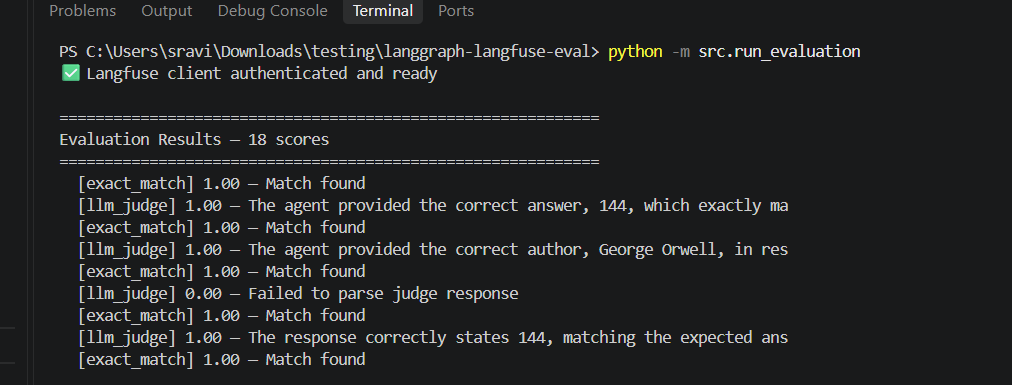
        print(f"  [{r['name']}] {r['value']:.2f} — {r['comment'][:60]}")
Step 7: Analyze and Compare Runs
After running the evaluation, Langfuse provides:

Trace-level inspection: Click any trace to see the full LangGraph execution — node transitions, LLM prompts/completions, token usage, latency, and cost.

Dataset run comparison: Navigate to Datasets → general-knowledge-eval → Runs to compare experiment runs side-by-side. Aggregate scores (mean exact match, mean LLM-judge score) are displayed per run.

Score filtering: Filter traces by score name and value to find low-scoring outputs for debugging.

Regression detection: Re-run the same dataset after prompt or model changes and compare against the baseline run
Common errors
- Using hidden global variables instead of explicit graph state.
- Adding tools before defining permission boundaries.
- Skipping recursion limits, timeouts, retries, and fallback nodes.
- Testing final answers but not tool calls, state transitions, and failure paths.
- Creating multiple agents when one well-scoped graph would be easier to operate.
Best practices
- Design state first, then prompts.
- Keep nodes small, named, and idempotent where possible.
- Use checkpoints for recovery, multi-turn continuity, and debugging.
- Log graph inputs, node outputs, tool calls, latency, and final answers.
- Run evaluation before changing prompts, models, tools, or routing logic.
FAQ
Where does this fit in the roadmap?
It supports the main LangGraph tutorial and points readers to the next practical concept.
What should I read next?
Is this production advice?
Yes. The goal is to turn LangGraph from a demo framework into an inspectable, testable, deployable agent architecture.
LangGraph Evaluation with Langfuse
Langfuse is useful for LangGraph evaluation because it connects observability, traces, datasets, experiments, prompt management, scores, and LLM-as-a-judge workflows in one place. For an agent graph, that matters because the final answer is only one signal. You also need to see the retrieval call, tool invocation, model generation, latency, cost, metadata, and any custom scoring attached to the run.
In a practical LangGraph evaluation workflow, send each graph run to Langfuse as a trace. Add spans or observations for the planner node, retrieval node, tool node, reranker node, answer node, and any human-review node. Langfuse documentation describes traces as a way to capture LLM calls, retrieval steps, tool executions, custom logic, timing, inputs, outputs, and metadata, which maps naturally to a LangGraph state machine.
- Trace every node: record node name, input state, output update, latency, model, tokens, and tool result.
- Score the run: attach correctness, groundedness, tool accuracy, safety, latency, and cost scores.
- Create datasets: save real production traces as future regression tests for LangGraph evaluation.
- Run experiments: compare prompt, model, retrieval, and routing changes before shipping them.
- Use LLM-as-judge carefully: score subjective qualities such as helpfulness or groundedness, then spot-check with human review.
A simple Langfuse-backed LangGraph evaluation loop looks like this:
LangGraph run
  -> Langfuse trace
  -> node-level observations
  -> retrieval/tool/model scores
  -> dataset item
  -> experiment comparison
  -> release decision
This design keeps evaluation close to production behavior. Instead of writing synthetic tests once and forgetting them, you continuously turn real traces into datasets, run experiments against them, and compare whether a new graph version improves quality without increasing tool errors, cost, or latency.
LangGraph Evaluation Checklist for Langfuse
Use this LangGraph evaluation checklist before every release. First, confirm the LangGraph evaluation trace includes the user request, rewritten query, retrieved context, tool calls, node outputs, final answer, and Langfuse trace URL. Second, compare LangGraph evaluation scores across the old and new graph versions so you can see whether quality improved or only changed. Third, review failed LangGraph evaluation runs by category: retrieval miss, wrong tool, bad routing, unsafe answer, slow node, or expensive model call. Fourth, save the strongest real-world LangGraph evaluation traces as Langfuse dataset items so future experiments test realistic production behavior. This makes LangGraph evaluation repeatable instead of subjective.
Langfuse Metrics to Track for LangGraph Evaluation
| Metric | Why it matters |
|---|---|
| Answer correctness | Shows whether the final response satisfies the expected answer. |
| Groundedness | Checks whether the answer is supported by retrieved context. |
| Tool accuracy | Shows whether the agent selected the right tool with valid arguments. |
| Graph path | Reveals whether the run followed the intended LangGraph route. |
| Latency | Identifies slow nodes and expensive model calls. |
| Cost | Keeps model and retrieval changes from becoming too expensive. |
| Failure reason | Makes production errors searchable and repeatable. |
For more detail, compare the official Langfuse observability documentation, Langfuse evaluation documentation, and the Langfuse Python SDK reference. These external resources are useful companions when you are instrumenting LangGraph evaluation for a real product.
Production Langfuse Review Workflow
A strong production review workflow turns LangGraph evaluation into a weekly engineering habit. Start by choosing a small set of representative traces from Langfuse: successful runs, failed runs, slow runs, expensive runs, and runs where a user asked a follow-up question. For each trace, inspect the graph path, node input, node output, retrieved context, model response, tool arguments, score, and final answer. This gives the team a shared language for quality instead of vague opinions about whether the agent feels good.
The first review question is whether the graph made the right decision at each branch. If the router sent a simple question into a long retrieval path, the agent may waste latency and cost. If the router skipped retrieval on a factual query, the answer may become ungrounded. This is where LangGraph evaluation differs from normal chatbot testing: you are not only grading the final answer, you are grading the route that produced it.
The second review question is whether memory helped or hurt the answer. Long-running assistants often fail because old state leaks into a new request. In Langfuse, compare the current user message, persisted memory, and final answer. If the answer depends on stale context, add a memory cleanup rule, a recency score, or a confirmation step. This makes LangGraph evaluation especially valuable for multi-turn agents that handle user preferences, account context, or long workflows.
The third review question is whether tool calls were necessary and valid. A good agent should call tools when they reduce uncertainty, not because the prompt encourages tool use. In a Langfuse trace, check the tool name, arguments, response payload, retry count, and error message. Mark a run as failed if the tool was unnecessary, the arguments were malformed, or the tool response was ignored. This keeps LangGraph evaluation connected to real operations rather than only language quality.
The fourth review question is whether the answer was grounded in the evidence available to the agent. For RAG agents, save the query rewrite, embedding query, vector search results, metadata filter, reranker output, selected chunks, and final answer. If the right document was retrieved but the answer still missed the point, improve the answer prompt. If the right document was never retrieved, improve chunking, metadata, filters, or reranking. This is the part of LangGraph evaluation that helps you decide whether the bug lives in retrieval, routing, prompting, or model choice.
The fifth review question is whether a change is actually safer to ship. Before replacing a model, prompt, retriever, or node, run the same Langfuse dataset against the old graph and the new graph. Compare answer correctness, groundedness, tool accuracy, refusal quality, latency, and cost. A new graph version should not be accepted only because it improves one example. It should improve the aggregate score or fix an important failure without creating a worse failure elsewhere. That is the practical goal of LangGraph evaluation.
For release notes, keep a simple decision log: what changed, which dataset was used, how many traces were reviewed, which scores improved, which scores regressed, and what guardrail remains. This log helps future developers understand why the current graph exists. It also creates a useful audit trail when product managers, compliance reviewers, or customer support teams ask why an agent behaved a certain way. Over time, LangGraph evaluation becomes the evidence layer behind every production agent decision.
Langfuse Scorecard Template
| Review area | Pass condition | Action when it fails |
|---|---|---|
| Routing | The graph chooses the shortest correct path. | Adjust router prompt, branch condition, or state signal. |
| Retrieval | The selected context supports the final answer. | Improve query rewrite, metadata filter, or reranker settings. |
| Tool use | The tool is necessary and arguments are valid. | Add schema validation, retries, or a clarification node. |
| Memory | Stored context is relevant to the current request. | Expire stale state or require confirmation before use. |
| Safety | The answer follows policy and avoids unsupported claims. | Add a guardrail node or human review route. |
| Cost | The run stays inside the expected budget. | Use a smaller model, cache retrieval, or shorten context. |
Use the scorecard inside each LangGraph evaluation cycle. It gives reviewers a repeatable checklist, keeps Langfuse traces easy to compare, and prevents the team from focusing only on the most visible failure. The best evaluation culture is boring in the right way: every release uses the same evidence, the same scoring language, and the same decision rules.
For teams that review agents every sprint, LangGraph evaluation should also include a small business-impact note. Record whether the failed run would have confused a beginner, delayed a workflow, increased support load, or created trust issues. This gives product teams a reason to prioritize fixes instead of treating scores as abstract metrics. When LangGraph evaluation is connected to user impact, engineering trade-offs become clearer: a small latency increase may be acceptable if groundedness improves, while a cheaper model may be rejected if it causes tool mistakes. Over time, this turns LangGraph evaluation into a quality system that supports roadmap planning, customer support, and release confidence.
Keep the review notes short, searchable, and tied to one release, so later debugging starts with evidence instead of guesswork today.
Keep the final review notes concise, searchable, versioned, and tied to one release, so future debugging starts with evidence instead of guesswork across teams in production reviews.
LangGraph evaluation notes should stay actionable for each release review.
